
Home office layout ideas small room work best when the chair zone, monitor distance, and walking path are planned before any furniture is bought. A desk that looks right in a photo can still block a door, crowd a chair, or push a screen too close to your eyes. Small rooms punish guesswork faster than large rooms do, so every inch needs a job.
A good layout starts with routine, not style. Think about how many hours you work, how many video calls you take, and whether anyone else shares the room. A laptop-only worker needs far less surface than a dual-monitor worker with paper files and a printer. Your layout should match your daily work, not an idealized photo.
The most common mistake is choosing the largest desk that fits the wall. That choice often leaves no room to pull the chair back, stand up, or open a drawer. A slightly smaller desk with clear chair space feels larger and works better all day. Comfort comes from movement space, not surface size alone.
Measure first, buy second, and test the layout with tape on the floor before you order. Tape shows door swings, chair pullback, and walking paths in real life. It costs nothing, takes ten minutes, and prevents the most expensive small-room error, which is furniture that must be returned.
Start With Measurements, Not Furniture
Measure the room, door, window, and outlets first
Measure wall to wall in inches, not feet alone, because small errors matter in a compact room. Record the door swing, window height, closet doors, radiators, vents, and baseboard heaters. Note every outlet location, since power decides where a desk can realistically sit without a cable crossing a walkway.
Measure ceiling height and any sloped ceiling sections, especially in attics and rooms under stairs. A desk under a slope may fit the floor plan but fail when you sit down and stand up. Record the lowest usable height above the chair zone, not just the highest point in the room.
Check the window sill height before planning a desk under a window. A low sill can block a monitor, clash with a standing desk, or limit shelf height above the desk. A high sill works better for a desk, while a low sill may suit a bench with storage below instead.
Measure your chair zone before you measure the desk
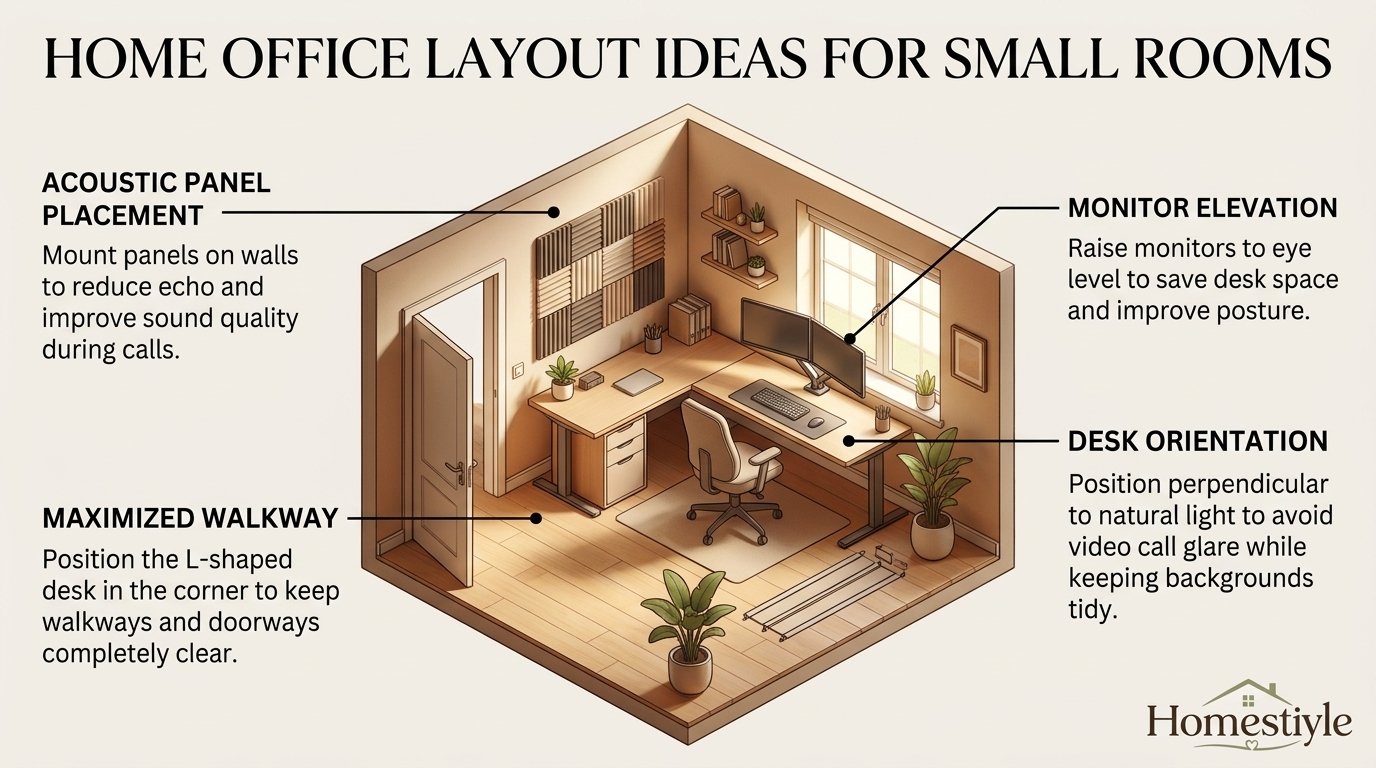
Your chair needs about 30 to 36 inches behind the desk edge to pull back, stand, and move comfortably. That zone matters more than an extra six inches of desk width. A chair that hits a wall, bed, or bookcase every time you stand will make the whole layout feel broken.
Sit in your chair and roll back fully, then mark that footprint with tape. Add space for armrests, a footrest, and any recline you actually use. Armless chairs save width, but they do not remove the need for pullback space behind the chair.
Test the door path while seated and while standing. You should be able to enter, sit, stand, and leave without moving furniture or squeezing past a desk corner. If the path fails this test, move the desk before you buy storage or decor.
Sketch a floor plan in 10 minutes
Draw the room as a simple rectangle on paper or in a free floor plan app. Mark the door, windows, outlets, closet, and fixed furniture first. Then draw the desk, chair zone, and storage wall as separate shapes, not as one vague work area.
Use numbered steps to keep the sketch honest and useful.
- Draw walls, door swing, windows, outlets, and fixed items.
- Draw the chair zone as a full rectangle, not just a chair icon.
- Draw the desk at its real width and depth.
- Draw storage on the wall, not on the floor, wherever possible.
- Walk the plan mentally from door to chair to storage to door again.
Keep the sketch visible while you shop, and check every product against it. A desk that is two inches too wide can break a walkway, while a shelf that is two inches too deep can block a door. Small numbers decide small rooms.
How Big Does a Small Home Office Need to Be?
A small home office does not need a spare bedroom, but it does need enough room for a desk, chair, and movement. The minimum depends on your equipment, your chair, and whether the room must also serve as a bedroom or guest room. One person with a laptop needs less space than two people with dual monitors.
The table below gives planning sizes, not legal guarantees. Local building rules vary, and a workspace can work well even when it does not count as a formal bedroom.
8 by 8 room: one person only
An 8 by 8 room gives 64 square feet, which is below the 70 square foot habitable room minimum cited by Autonomous from International Residential Code summaries. That figure matters for how a room is classified, not for whether you can work there. Treat 8 by 8 as a workspace, not as a full bedroom plus office.
Put the desk against the wall opposite the door when possible, with the window to one side. That position gives the longest clear walking path and leaves one full wall for vertical storage. A desk under the window can work, but glare and camera backlighting need a plan.
Choose one storage wall and stop there in an 8 by 8 room. A wall shelf above the desk, one narrow bookcase, and under-desk storage cover most needs. A credenza, printer stand, and second guest chair will not all fit without breaking the walking path.
10 by 10 room: one person comfortably, two people with rules
A 10 by 10 room gives 100 square feet, which is 56 percent more floor than an 8 by 8 room. That extra space changes what is possible, especially for storage and a second desk. One person can add a reading chair, a printer station, or a guest chair without crowding the chair zone.
Two people can work in 10 by 10, but only with clear zones, call rules, and shared storage limits. Each person needs a desk, a chair zone, and personal storage, plus a shared zone for paper and supplies. Without those rules, noise and clutter will fill the extra space fast.
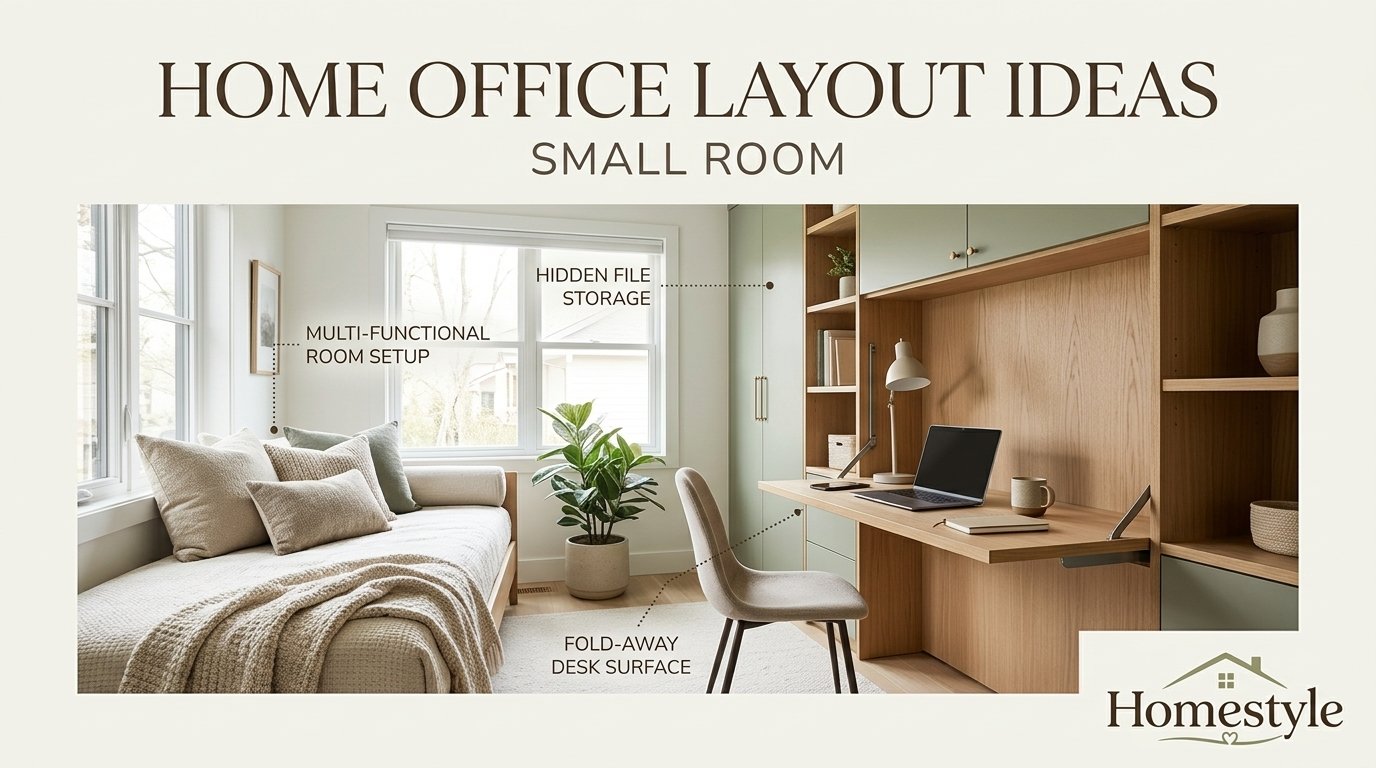
A 10 by 10 room also allows a guest bed plus desk plan, but only if one function stays secondary. A Murphy bed, sofa bed, or daybed works better than a full bed plus a full desk. Choose which role the room plays most days, and design around that role.
10 by 12 room: the first size that allows a guest zone
A 10 by 12 room gives 120 square feet and a longer wall for desk plus storage. That length lets you separate work and rest zones with a rug, a bookcase, or a divider. A guest bed can sit on the short wall while the desk owns the long wall.
Even in 10 by 12, keep the chair zone clear and the door path open. Extra length tempts people to add a second bookcase, a large plant, and a side table. Each addition narrows the walking path and makes the room feel smaller than its measurements suggest.
Desk Placement: Window, Wall, or Corner?
Desk placement decides light, glare, camera background, and focus in one move. There is no single best position for every room, because window direction, door location, and call frequency change the answer. Choose placement by testing light and movement, not by copying a photo.
Desk by the window, side on to the light
Place the desk so the window sits to your left or right, not directly in front of or behind the screen. Side light gives daylight without strong glare or a silhouetted video call image. Sheer blinds soften direct sun while keeping the room bright and open.
Side placement also gives your eyes a natural break during long work sessions. A quick look outside rests focus without leaving the chair. Keep the monitor slightly angled away from the window during bright hours, and test the setup at morning, midday, and afternoon.
A desk directly facing a window can work for paper work and reading, but it often creates screen glare. If you face the window, use blinds, a matte screen, and a monitor hood or repositioning plan for sunny hours. Do not accept daily squinting as a normal part of the layout.
Desk against the wall for focus and storage
A wall desk is the most reliable small-room layout, because it frees floor space and puts storage directly above the work surface. Floating shelves, a pegboard, and a wall lamp all work without using floor area. Cable routing stays simple when outlets sit on the same wall.
Facing a wall can feel enclosed, so add warm task light, a pinboard, art, or a plant at eye level. Keep the wall color light and the shelf contents tidy, since a cluttered wall becomes visual noise all day. A clean wall behind the monitor also helps video calls look calm.
Wall desks work best when the chair can pull back fully without hitting another wall or bed. If pullback fails, choose a narrower desk or move the desk to a longer wall. A wall desk that traps the chair is worse than a smaller desk in a better spot.
Corner desk for awkward rooms
A corner desk turns wasted triangular space into a real workstation. An L-shaped desk gives two work surfaces, one for the monitor and one for paper, notes, or a second device. That split helps writers, coders, and students who switch between screen and paper often.
Corners can feel dark, so add a task lamp and keep the corner walls light. A corner shelf above the desk adds storage without blocking the main room. Avoid deep corner units that push the monitor too far back or force an awkward neck turn.
Test the corner with your actual chair and monitor before committing. Sit, type, turn to the second surface, and stand up. If you must twist your neck or shoulders to see the main screen, center the main monitor and use the return only for secondary tasks.
Floating desk in the middle of the room
A floating desk works only when the room has clear floor space around it. It can create a strong camera background, a clean view of the door, and breathing room on both sides. It also needs a cable plan, since power cannot simply run to the nearest wall.
Use a floating desk when the room is at least 10 by 10 feet and the door path stays clear on both sides. In smaller rooms, floating a desk usually wastes the most valuable asset, which is the wall for storage. A wall desk plus a rug often gives the same open feel with less compromise.
8 by 8 Home Office Layout Plan
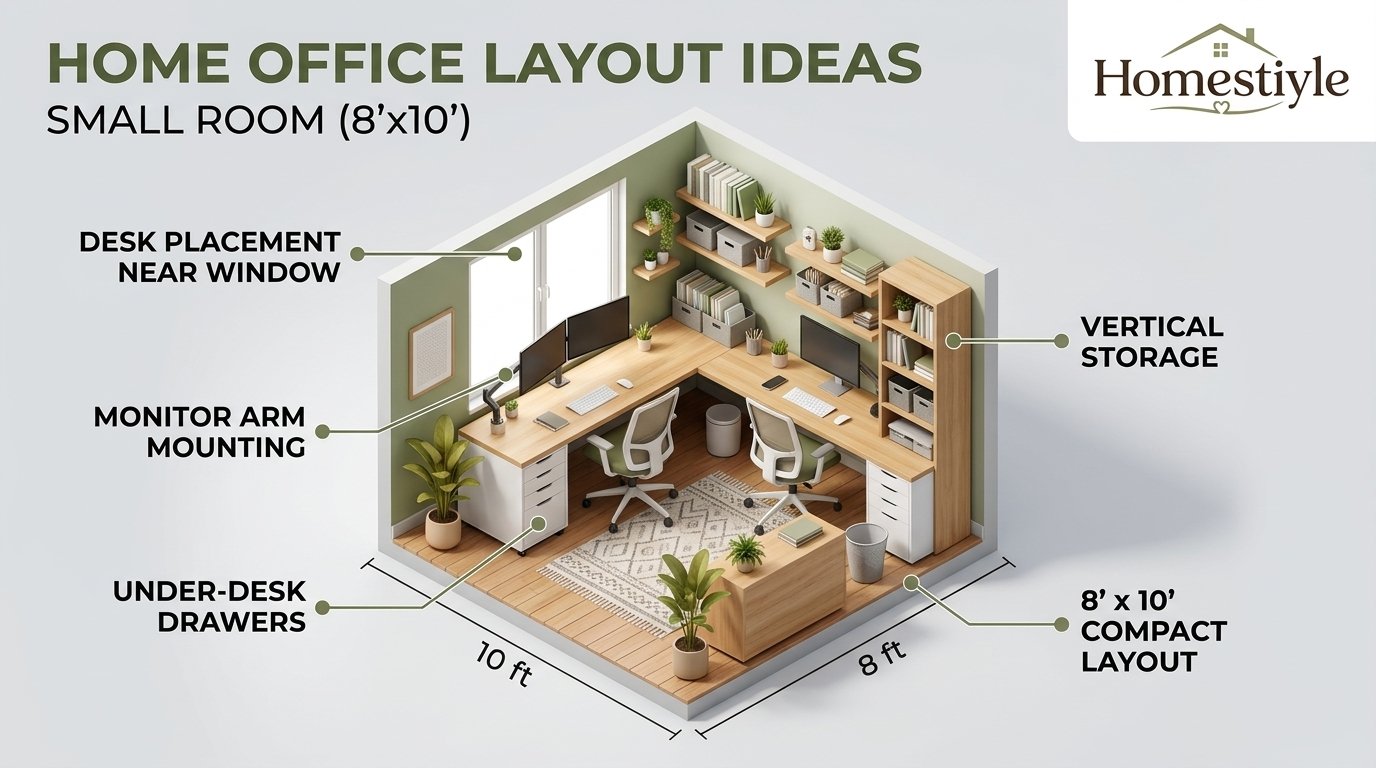
Start with a 48 inch wide desk against the wall opposite the door. Use 24 inches of depth for a single monitor, keyboard, and notes. Add a monitor arm to free desk surface and to set screen distance without pushing the desk deeper.
Put storage on the desk wall only in the first version of the plan. Floating shelves above the desk hold books, supplies, and a small plant. A narrow 12 inch bookcase on a spare wall works if the 30 inch walking path stays clear after it is placed.
Keep the walking path at 30 inches minimum where space allows, and wider if you use a large chair. The US Access Board describes a 36 inch minimum clear width for accessible routes under ADA Standards, but those standards do not automatically apply to every private home room. Use 36 inches as a comfort target, not as a home law.
What does not fit in 8 by 8
A credenza, a printer stand, and a second guest chair do not all fit in 8 by 8 without breaking circulation. Pick one of those three, and move the others to another room or to rolling storage. A printer on a rolling cart can visit the office and leave again, which suits a tiny room.
A large executive desk also fails in 8 by 8, because depth eats the chair zone and walkway at the same time. A 30 inch deep desk plus a 36 inch chair zone already uses 66 inches of an 96 inch room. Add a bookcase and the room feels like a corridor, not an office.
10 by 10 Home Office Layout Plans
A 10 by 10 room supports four strong plans, but each plan makes a different trade. Choose the plan that matches your main work, then add only the storage that plan allows. Do not try to combine all four plans in one room.
Plan A: single desk and storage wall
Place a 60 inch desk on one wall and a full storage wall opposite the door. This plan suits dual monitors, paper work, and a printer on a low cabinet. The chair zone stays clear, and the storage wall keeps supplies out of sight.
Use closed cabinets for messy supplies and open shelves only for books and decor you want to see. Closed storage makes a small room look calmer on video calls and in daily use. Label the inside of each cabinet so the system survives busy weeks.
Plan B: L-shaped desk for dual monitors
Place an L-shaped desk in a corner with the main monitor centered on the long side. Use the return for a laptop, notes, or a second monitor at a slight angle. Keep the main monitor directly in front of you, not turned to the side for long work.
An L-shaped desk needs a chair that can swivel smoothly between surfaces. Test the turn from main screen to return without hitting a wall or storage unit. If the turn feels tight, shorten the return or move the desk to a longer wall.
Plan C: two desks on opposite walls
Place two compact desks on opposite walls, each about 48 inches wide, with a shared storage zone between them. Each person faces a wall, which reduces direct eye contact and video call distraction. A central rolling cart holds shared paper and supplies.
Set call rules before the first shared workday, including headset use, meeting overlap, and a signal for do-not-disturb time. Two desks without rules feel crowded even when the measurements work. With rules, opposite walls give privacy without a physical divider.
Plan D: desk plus guest bed
Use a Murphy bed, sofa bed, or daybed on one wall and a wall desk on the opposite wall. Design the room as an office on most days and a guest room on some days, not as both at full size every day. A fold-down desk can also work when guests stay often.
Keep guest bedding in closed storage near the bed, not on the desk. A guest zone that borrows desk space every weekend will slowly take over the office. A clear reset routine, with bed folded and desk cleared, protects the work layout.
Small Bedroom Office Layout
A bedroom office must separate work and rest without a wall between them. That separation can be visual, not structural. A rug, a bookcase, a curtain, or a change in wall color can mark the work zone clearly enough for daily use.
Place the desk where it is out of view from the bed when possible. That small shift helps your brain switch off at night and focus in the morning. If the desk must face the bed, use a divider or a closed cloffice door at the end of the workday.
Use a glass or light-colored desk when the bedroom feels heavy or dark. Glass and pale finishes reflect light and look less bulky than a dark wood desk. A mirror on the work wall can also add light, but keep it out of the video call frame if it creates distraction.
Keep the bed out of the camera frame
Angle the desk so the camera shows a tidy wall, shelf, or art, not an unmade bed. A plain background looks professional and avoids awkward video call moments. Test the frame with a real call, not just by looking at the room.
Add a room divider or curtain behind the chair when the bed cannot be avoided. A simple fabric panel or tall plant can block the bed from the camera without a renovation. Keep the divider light and movable so the bedroom still feels open after work.
Rug zoning versus a divider
A rug defines a work zone under the desk and chair without blocking light or air. Choose a rug large enough for the chair to roll on without catching an edge. A rug that is too small becomes a trip hazard and a daily annoyance.
A divider gives stronger visual separation but can darken a small bedroom and block airflow. Use a low bookcase or an open shelf divider when you want separation plus storage. Use a rug alone when light and openness matter more than privacy.
Desk between wardrobes
A desk between wardrobes or tall shelves creates a built-in look without custom cabinetry. The side units frame the work zone and hold books, files, and supplies. Keep the desk width matched to the gap, with a small margin for cables and chair movement.
Measure the gap at floor, desk, and shelf height, since walls and wardrobes are rarely perfectly straight. A desk that fits at the floor may clash with a wardrobe door at chair height. Test wardrobe doors and drawers with the chair in place.
Cloffice Layout: A Closet Office That Works All Day
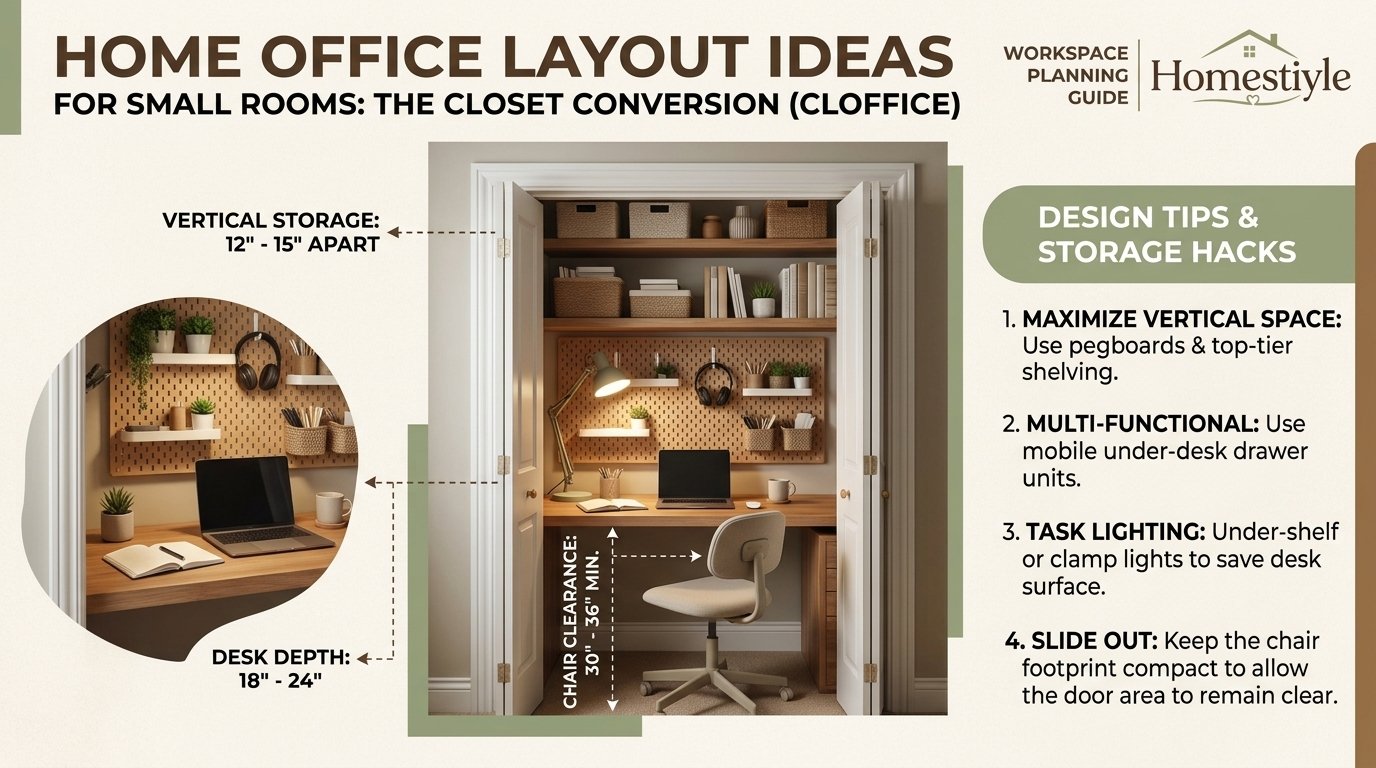
A cloffice turns an underused closet into a compact office with doors that close at night. That closing ritual is powerful for work-life separation in a small home. The closet must still support daily work, not just occasional laptop use.
Use a desk depth of 24 inches when possible, with a monitor arm to protect screen distance. A 20 inch deep desk can work for a laptop, but it often forces the screen too close and leaves no forearm support. Prioritize depth over width in a closet.
Add task lighting inside the closet, since closets rarely have good natural light. A wall-mounted lamp, an under-shelf light bar, and a small ring light for calls cover most needs. Test lighting with the closet doors open and closed, since shadows change fast in a tight space.
Desk depth, lighting, and ventilation in a closet
Ventilation matters more in a cloffice than in a normal room, because two walls sit close to your body and equipment. Leave the doors open during long work sessions when possible, or add a small fan for airflow. A hot, stuffy closet will shorten focus even when the desk fits.
Check power inside the closet before building the desk. If outlets sit outside the closet, plan a safe cable route that does not cross a walkway or pinch under a door. A power strip inside the closet, with a cable tray, keeps cords tidy and reachable.
Use closed storage in a cloffice to hide supplies when the doors close. Open shelves look good in photos but collect dust and visual clutter in a tight space. One closed cabinet plus a small shelf for daily items beats three open shelves.
Doors on, doors off, or pocket doors
Keep the doors on when you need daily separation between work and home. Closing the doors at night turns the room back into a bedroom or living space. That ritual helps many remote workers stop checking work after hours.
Remove the doors when the closet feels too dark or cramped for daily work. An open cloffice with a curtain gives separation without a solid door blocking light and air. A curtain can also hide the office on video calls when pulled closed behind the chair.
Pocket doors work well in a renovation, but they need wall space and professional installation. Do not assume a pocket door fits an existing closet wall without checking studs, wiring, and plumbing. For renters, a curtain or bifold doors are safer choices.
When a cloffice is too small for daily work
A cloffice under 24 inches deep or under 36 inches wide is usually too small for daily monitor work. Laptop-only work, reading, and short admin tasks can still work there. Daily dual-monitor work needs a larger desk and a real chair zone.
Test a cloffice for a full workday before committing to it. Sit, type, take a call, stand, and stretch in the space. If your knees hit the wall, your elbows hit the sides, or your screen sits too close, move the office to a corner or wall desk instead.
Two-Person Small Home Office Layout
Two people in a small room need zones, sound rules, and storage limits more than they need a larger desk. Desk width alone does not solve noise, meeting overlap, or clutter migration. Plan the social rules at the same time as the floor plan.
Give each person a personal zone with a desk, chair zone, task light, and personal storage. Add one shared zone for paper, printer supplies, and reference books. Label personal and shared storage clearly, so supplies do not drift across the room.
Use soft surfaces to reduce echo and keyboard noise, including a rug, curtains, fabric panels, and upholstered chairs. Acoustic panels behind each desk help in hard-surfaced rooms, but they do not make a room soundproof. Headphones remain essential for calls.
Opposite walls for call privacy
Opposite walls give each person a separate camera background and reduce direct eye contact during calls. Each person faces a wall, which limits visual distraction and makes headset use feel natural. This layout works best in a 10 by 10 room or larger.
Place shared storage in the middle of the room only when the walking path stays clear. A low bookcase or rolling cart between desks can divide zones without blocking light. A tall divider between opposite desks can feel like a wall and darken the room.
Back-to-back desks for a narrow room
Back-to-back desks work in a narrow room where opposite walls are too close for two chair zones. Each person faces outward, which gives a sense of personal space despite the shared room. Chair zones must still clear each other when both people stand at once.
Test back-to-back seating with both chairs pulled back at the same time. If chairs collide, stagger the desks, shorten one desk, or switch to opposite walls. A layout that works for one person alone can fail the moment both people move.
Shared bench desk with personal zones
A long bench desk looks tidy and gives a shared work surface for couples or collaborators. Divide the bench into personal zones with a lamp, organizer, and monitor position for each person. A small plant or shelf in the middle marks the boundary without a wall.
A bench desk fails when meeting times overlap and both people need quiet at once. Agree on a call schedule, a headset rule, and a backup spot for loud or sensitive calls. A bench desk plus a second quiet corner beats a bench desk alone.
Meeting overlap rules and headset rules
Create a simple meeting calendar check each morning, so overlapping calls are spotted before they start. Stagger long meetings when possible, and move one loud call to another room. A shared calendar habit prevents most two-person office friction.
Use a clear headphone signal, such as headphones on means do not disturb unless urgent. Add a white noise machine or soft background sound to mask sudden noises. These small rules protect focus better than an expensive divider alone.
Desk Size by Task
Desk size should follow task, monitor count, and paper use, not room size alone. A desk that fits the wall but fails the task will force bad posture and clutter. Start with the task, then check the room.
Laptop only
A 36 inch desk works for laptop-only use, especially with a laptop stand and external keyboard. A stand raises the screen toward eye level, while the external keyboard keeps wrists neutral. Without those two items, long laptop days strain the neck and wrists.
Keep a small notebook zone beside the laptop, not behind it. A notebook behind the screen forces reaching and twisting. A narrow desk with a clean side zone beats a wider desk covered in clutter.
Single monitor plus keyboard
A 48 inch desk is a useful starting point for a single monitor, full-size keyboard, and mouse. That width leaves room for a notebook, a drink, and a small organizer without crowding the keyboard. A monitor arm helps by removing the stand footprint from the desk.
Set the monitor directly in front of you, with the top at or just below eye level. OSHA Computer Workstations guidance summaries put screen distance at 20 to 40 inches, with at least 20 inches as a minimum. A 24 inch deep desk plus a monitor arm usually reaches that range.
Dual monitors
Dual monitors need 60 inches of width or an L-shaped desk, especially when both screens are used equally. Center the split between the screens in front of you when both matter equally. Center the primary screen and angle the secondary screen when one screen dominates.
Use a dual monitor arm in a small room to free desk depth and to align screen height. Two separate stands eat surface and make height matching harder. Test the arm with your actual monitors, since weight and size limits vary by model.
Dual monitors plus paper work
Paper work needs a separate surface zone, not a stack on top of the keyboard. A 60 to 72 inch desk, or an L-shaped desk with a return, gives paper its own place. A document holder beside the monitor keeps paper at a readable angle without neck twisting.
Keep paper in a vertical sorter or tray at the end of the workday. Paper left on the desk becomes the next day’s clutter and shrinks the usable surface. A five-minute reset protects the layout better than a larger desk.
Ergonomics in a Small Room
Ergonomics in a small room means fitting the chair, desk, and screen to your body, not forcing your body to fit the furniture. Small rooms make this harder, because depth and clearance are limited. The same rules still apply, but the solutions must be compact.
Ergonomics guidance here is general information only, not medical advice. If you have pain, numbness, tingling, or a diagnosed condition, seek advice from a clinician or qualified ergonomist. Do not use a layout guide as a substitute for professional care.
Monitor height and distance
Set the top of the screen at or just below eye level, with the center slightly below eye level. That position keeps the neck neutral during long sessions. A monitor arm, riser, or laptop stand can reach that height without a deeper desk.
Keep the screen about 20 to 40 inches from your eyes, following OSHA Computer Workstations guidance summaries. A screen that is too close causes eye strain, while a screen that is too far causes leaning forward. Test distance with your normal font size and screen brightness.
Tilt the screen back 10 to 20 degrees to reduce glare and neck strain, following common ergonomics summaries. Center the primary monitor directly in front of you, not to one side. A side monitor used all day forces a constant neck turn.
Chair setup and foot support
Adjust the chair so your feet rest flat on the floor or on a footrest. Thighs should sit roughly parallel to the floor, with a small gap behind the knees. Lumbar support should maintain the natural curve of the lower back, not push it flat.
Choose a chair that fits under the desk and rolls back fully without hitting a wall. Armless chairs save width in a small room, but they must still support the back and seat height. A dining chair with a cushion works for short sessions, not for daily full-time work.
Use a footrest when your feet do not reach the floor at the correct desk height. A footrest also helps shorter users keep knees and hips at a comfortable angle. Do not dangle feet all day, since that strains the lower back and legs.
Keyboard, mouse, and wrist position
Keep elbows close to the body at about 90 to 110 degrees, with forearms roughly parallel to the floor. Cornell University ergonomics summaries put desk height for most adults at 28 to 30 inches, which matches that elbow position for many users. Adjust chair height first, then desk height if possible.
Keep the keyboard and mouse close to the body, on the same plane, with wrists straight. Reaching forward to a mouse at the far edge of a desk strains the shoulder and wrist. A compact keyboard can help small desks by bringing the mouse closer.
Use a wrist rest only for resting between typing, not for pressing down while typing. Keep wrists neutral, not bent up, down, or sideways. If pain persists, change the setup and seek professional advice rather than buying another accessory.
Sit-stand routine without a large desk
A sit-stand desk does not need a large footprint to work in a small room. A 40 to 48 inch electric desk can support a single monitor and a laptop for many users. Check height range, weight capacity, and stability at full height before buying.
Alternate sitting and standing in short blocks, rather than standing all day. A common pattern is sitting for focused work, standing for calls and reading, then sitting again. An anti-fatigue mat helps during standing blocks, especially on hard floors.
Keep the monitor distance correct in both sitting and standing positions. A monitor arm helps, since it can move the screen as desk height changes. Test both positions before finalizing cable length and shelf height.
Lighting Plan for a Small Home Office
Lighting in a small room needs three layers: ambient light for the room, task light for the desk, and bias light behind the monitor. One overhead light alone creates harsh shadows and screen contrast problems. Layered light feels brighter without making the room harsh.
Competitor lighting guides commonly cite 300 to 500 lux for desk work, with warmer light for evening work and cooler light for focused daytime work. Those figures are planning guides from lighting retailers and design guides, not a single universal home office law. Verify current Illuminating Engineering Society guidance before citing a lux target as a standard.
Ambient, task, and bias light layers
Ambient light should fill the room evenly, without a single harsh overhead source. A ceiling light plus a floor lamp or wall light often works better than one bright fixture. Dimmer switches help, since daylight changes through the day.
Task light should sit on the opposite side from your writing hand, so your hand does not cast a shadow on paper. Right-handed users usually place the lamp on the left, and left-handed users on the right. An adjustable arm lamp lets you move light as tasks change.
Bias light behind the monitor reduces contrast between a bright screen and a dark wall. A simple LED strip behind the monitor, set to a soft warm or neutral white, helps during evening work. Keep bias light subtle, not colorful, during focused work and calls.
Window glare control
Control glare with sheer blinds, curtains, or repositioning before adding more light. A screen facing a bright window will glare even with a strong desk lamp. A screen with a window directly behind you will silhouette your face on video calls.
Test glare at different times of day, since sun angle changes with season and time. Morning light from an east window differs from afternoon light from a west window. A layout that works at 9 a.m. can fail at 4 p.m. without blinds.
Use matte screen finishes and avoid glossy desk surfaces that reflect light into the screen. A desk mat in a matte color reduces reflection and gives the mouse a consistent surface. Small surface choices matter in a bright small room.
Video call lighting position
Place your main video light in front of you, at roughly eye level, facing your face. Light from behind creates a silhouette, while light from directly above creates harsh shadows. A ring light, a table lamp with a diffuser, or a monitor light bar can all work.
Keep the background wall lit softly, so you do not appear against a dark void. A lit shelf, plant, or art behind you looks calm and professional. Avoid a bright window directly behind you during calls, since cameras expose for the window, not your face.
Test your call setup with a real video call and a friend, not just a mirror check. Ask about brightness, shadows, and background distraction. A five-minute test saves weeks of apologizing for a dark or washed-out image.
No-window office lighting
A no-window office needs strong ambient light plus a focused task lamp. Use a ceiling light, a floor lamp, and a desk lamp together, rather than one dim source. Tunable white LEDs let you shift from cooler daytime light to warmer evening light.
Add a light-colored wall and a mirror or light art to bounce light around the room. Dark walls in a windowless room feel like a cave, even with a good lamp. Keep the desk surface light as well, since a dark desk absorbs task light.
Take breaks outside the room when possible, since no artificial light fully replaces daylight. A short walk, a window break in another room, or a lunch outside helps focus. Lighting can support work, but it cannot replace daylight breaks.
Storage Without Floor Furniture
Storage in a small office should go vertical first, under the desk second, and rolling third. Floor furniture should be the last choice, because it eats the walking path and chair zone. A tall, narrow storage wall beats a wide, low cabinet in most small rooms.
Use closed storage for messy supplies and open storage only for items you want to see daily. Closed cabinets hide paper, cables, and chargers, which makes the room look larger and calmer. Open shelves work for books and decor, but they need regular editing.
Keep frequently used items at arm height and rarely used items higher or lower. A shelf that requires a chair to reach will not be used daily. A drawer that requires moving the chair will not be used either.
Wall storage first
Floating shelves above the desk give storage without floor space, but they need strong wall anchors for heavy books and equipment. Check wall type before loading shelves, especially in older homes with plaster walls. A shelf that sags or pulls out creates a safety problem, not just clutter.
Use a pegboard or rail for small tools, cables, and supplies that would otherwise cover the desk. Pegboards keep items visible and reachable without a drawer search. Keep the pegboard tidy, since a crowded pegboard becomes visual noise.
Label shelf zones by task, such as reference, supplies, and personal items. Labels help housemates and family members return items to the right place. A storage system that only one person understands will fail within a month.
Under-desk storage second
Under-desk storage works when it does not block legroom or chair movement. A single two-drawer unit on the side away from your legs often fits without crowding. A rolling pedestal can move out for cleaning and back for work.
Keep the cable zone separate from the storage zone under the desk. Cables tangled around a drawer unit make both storage and cleaning harder. A cable tray under the desk keeps cords off the floor and away from drawers.
Rolling storage third
A rolling cart gives flexible storage that can move to the desk, to a printer, or out of the room. Use it for paper, craft supplies, or shared items that do not need a permanent home. Tuck the cart under a desk return or against a wall when not in use.
Choose a cart with locking casters so it does not roll during work. A cart that drifts into the walking path becomes a trip hazard. Keep the cart height below desk height when it must slide under a surface.
Printer, paper, and filing plan
Place the printer where you can reach it without standing in a tight space, or accept that printing means standing up. A printer on a low cabinet beside the desk works for frequent printing. A printer in another room works for occasional printing and saves office space.
Store paper in a vertical file or tray near the printer, not in stacks on the desk. Digitize paper you do not need to keep, using a scanner app or a small scanner. A one-in, one-out rule for paper prevents the slow takeover of desk surface.
Noise, Privacy, and Calls
Noise is often the first failure in a shared small office, before desk size or storage. Hard floors, bare walls, and two people on calls create echo and distraction fast. Soft surfaces and clear rules help more than a single expensive product.
Competitor guides cite a survey of 62,360 office occupants in which acoustics was the top complaint at 54 percent. That figure comes from a competitor summary, not from a primary study checked in this research, so treat it as a signal, not as verified data. The practical point stands: plan sound early, not after complaints start.
Soft surfaces and acoustic panels
Add a rug, curtains, and fabric panels to absorb sound in a hard-surfaced room. Acoustic panels behind each desk reduce echo, especially in rooms with wood floors and bare walls. Panels now come in colors and shapes that look intentional, not industrial.
Do not expect panels to make a room soundproof. They reduce echo and soften noise, but they do not block a loud call through a thin wall. For true privacy, combine panels with headphones, a closed door, and a call schedule.
Place panels at ear height behind each desk for the best effect in a small room. A panel behind a monitor does little, while a panel at head height catches voice reflections. Test with a call before adding more panels.
Headphones and white noise
Noise-cancelling headphones are the most reliable tool for shared office focus. They block typing, talking, and household noise better than any divider. Choose a comfortable pair with a clear microphone for calls, and keep them charged at the desk.
A white noise machine or soft background sound can mask sudden noises, such as a door closing or a phone ringing. Complete silence can feel just as distracting as noise, because every small sound stands out. Consistent background sound smooths those peaks.
Agree on a headphone signal for do-not-disturb time, and respect it. A signal that is ignored will be abandoned, and the room will return to constant interruption. A simple rule, followed consistently, beats a complex system.
Camera background and door signal
Choose a calm camera background with a shelf, plant, or art, not a cluttered desk or open closet. A tidy background helps calls feel professional and reduces visual distraction for other participants. Keep personal items out of the frame when possible.
Use a door signal for important calls, such as a small sign or a closed door. A signal helps housemates know when not to enter, knock, or start a loud task nearby. Combine the signal with a shared calendar so important calls are known in advance.
Power, Cables, and Wi-Fi
Power planning should happen before furniture arrives, because outlets decide desk placement and cable routes. Count every device, including monitor, laptop charger, phone charger, lamp, printer, and speaker. One outlet behind a desk is rarely enough for a modern setup.
Use a power strip with surge protection mounted under the desk or on the wall, not loose on the floor. A mounted strip keeps plugs reachable and cables off the walking path. Label plugs when several devices share one strip, so troubleshooting stays simple.
Route cables along the wall or under the desk, never across a walking path. A cable tray, raceway, or cord cover keeps cables tidy and prevents trips. Coil excess cable length with Velcro straps, rather than letting it pile on the floor.
Count devices before you buy a power strip
List every device that needs power, USB, or data in the office. Include devices that charge only at night, since they still need an outlet. Add one spare outlet for a future device, such as a second monitor or a heater in winter.
Check the circuit load when adding a heater, printer, or multiple monitors to a small room. Most home office devices draw little power, but a space heater plus a printer can trip a circuit. When in doubt, ask an electrician rather than adding more strips.
Cable route that does not cross a walkway
Plan the cable route from outlet to desk to device as a single line along a wall. Use a cable tray under the desk for the main run, and short cords from the tray to each device. A clean route makes cleaning easier and reduces dust buildup.
Keep printer and charging cables separate from daily work cables when possible. A charging station on a shelf or cart keeps phone and tablet cords out of the work zone. A tidy cable plan also makes it easier to move the desk later.
Router, mesh, and wired options
Test Wi-Fi signal strength at the desk before finalizing the layout. A desk in a far corner or basement may need a mesh node or a wired connection. A mesh system or a cable can help, but placement still matters, so test with a real video call.
Use a wired Ethernet connection for the main work computer when possible, especially for video calls and large files. A wired connection is more stable than Wi-Fi in a crowded home network. Run the cable along a wall or under a rug edge, not across a doorway.
Small Room Problems and Fixes
Small rooms create predictable problems, and each problem has a layout fix. The fix is rarely a larger desk. Most fixes involve moving storage to the wall, clearing the chair zone, or changing light and sound.
Room feels cramped
A cramped feeling often comes from floor furniture, dark colors, and clutter, not from room size alone. Replace a floor bookcase with wall shelves, lighten the wall color, and clear the desk surface. A visible floor area makes a room feel larger instantly.
Use open-frame furniture and armless chairs where possible, since solid, bulky pieces block sight lines. A glass desk or a light wood desk looks less heavy than a dark executive desk. Keep the area around the door clear, since a blocked entry makes any room feel tight.
Room overheats
A small room with two people, monitors, and a printer heats up fast, especially with a closed door. Open the door between calls, use a small fan, and keep vents clear of furniture. A room that overheats will hurt focus even when the desk layout is perfect.
Check that vents and radiators are not blocked by a desk, bookcase, or curtain. Blocked vents waste energy and create hot and cold spots. A desk against a radiator also risks heat damage to equipment and discomfort for legs.
Desk blocks the door
A desk that blocks a door swing is a safety and daily use problem, not a minor annoyance. Move the desk to a longer wall, shorten the desk, or change the door to a sliding or pocket door in a renovation. Do not accept a door that only opens halfway.
Test the door with the chair pulled back and with a guest entering the room. A layout that works when you are alone can fail when someone else enters. A clear entry path also helps in an emergency, when fast exit matters.
Chair hits the wall or storage
A chair that hits a wall, bed, or storage unit every time you stand will wear out patience and furniture. Shorten the desk depth, move storage to another wall, or choose a narrower chair. A chair zone that works in both directions is worth more than a wider desk.
Check drawer and door clearance as well as chair clearance. A filing drawer that cannot open fully, or a closet door that hits the chair, breaks the workflow. Test every moving part in the room, not just the chair.
Renter Friendly Small Office Layout
Renters need a layout that leaves no damage and can move to the next home. Wall shelves, desks, and panels must use renter-safe fixings or freestanding alternatives. Check the lease before drilling, painting, or removing doors.
Use freestanding shelves, rolling carts, and leaning desks when drilling is not allowed. A tall freestanding shelf against a wall gives vertical storage without holes. A leaning desk or a console table can work as a desk without wall mounting.
No-drill storage options
No-drill options include adhesive hooks for light items, tension rods for curtains, freestanding shelves, and over-door organizers. Adhesive products vary by wall type and weight, so test one hook before loading a full shelf. Do not hang heavy books with adhesive strips alone.
Use command-style hooks for cables, headphones, and light organizers, and keep heavy storage on the floor or on freestanding units. A falling shelf damages walls, equipment, and trust with a landlord. Safety matters more than a perfect photo.
Reversible changes only
Choose changes that can be reversed in an afternoon, such as a rug, a curtain, a freestanding divider, and a desk lamp. Paint, built-in shelves, and removed doors are harder to reverse and may cost a deposit. Photograph the room before changes, so move-out restoration is clear.
Keep original hardware and doors when you remove closet doors or change handles. Store removed items safely and label them by room. A missing door or handle at move-out creates a cost that no layout improvement justifies.
What to check in the lease
Check lease rules for drilling, painting, door removal, and electrical changes before starting work. Some leases allow small nail holes, while others forbid any wall changes. Ask the landlord in writing when the rule is unclear, and keep the reply with your lease.
Check renter insurance and liability when adding heavy shelves or a standing desk. A falling shelf or a tripped cable can cause injury or damage. A safe, stable layout protects you, your housemates, and your deposit.
Budget Tiers: Renter, Mid, and Built-In
Budget tiers help you spend on what changes daily use first, not on decor. A good chair, a correct monitor position, and good task light matter more than a premium desk finish. Spend in that order, then add storage and style.
Price figures below are competitor-reported tiers from a desk buying guide, not current US prices. Check current US listings before buying, since prices change by configuration, size, and retailer. Do not treat a tier as a quote.
What to buy first
Buy the chair, monitor position, and task light first, since those affect comfort every day. A monitor arm or riser can fix screen height without a new desk. A good task lamp can fix a dark corner without a renovation.
Buy storage second, starting with wall shelves and under-desk storage. Storage that arrives after the desk often ends up on the floor, where it blocks the walking path. Plan storage with the desk, even if you buy it a week later.
What to skip in a small room
Skip a large executive desk, a credenza, and a second guest chair in a small room. Those pieces look impressive in a large office but crowd a small layout. Skip open shelves for messy supplies, since they become visual clutter fast.
Skip decor that blocks light or airflow, such as tall plants in front of a window or heavy curtains over a vent. Decor should support work, not compete with it. One plant, one art piece, and one personal item often beat a crowded shelf.
Small Home Office Layout Checklist
Use this checklist before ordering furniture, and again after setup.
- Room measured in inches, including door swing and window sill height.
- Chair zone taped on the floor, with full pullback and standing space.
- Walking path clear from door to chair to storage and back to door.
- Desk size matched to task, monitor count, and paper use.
- Monitor top at or just below eye level, with screen distance checked.
- Task light placed opposite the writing hand, with glare tested at different times.
- Storage planned on the wall first, under the desk second, rolling third.
- Power counted, cable route planned, Wi-Fi tested with a real video call.
- Call rules agreed for shared rooms, including headset and meeting overlap rules.
- End-of-day reset defined, so the room returns to rest or guest use after work.
FAQs
What is the best layout for a small home office?
The best layout puts the desk on a long wall, the chair zone clear behind it, and storage on the wall above or beside it. Side-to-window placement gives daylight without strong glare for most rooms. Test the layout with tape before buying, since door and window positions change the best choice.
How small can a home office be?
A laptop desk zone can work in 35 to 50 square feet, according to competitor planning guides. That size suits short or laptop-only work, not a full dual-monitor setup with storage. A dedicated room for daily work usually needs at least 64 square feet, with a clear chair zone.
Is an 8 by 8 room big enough for a home office?
Yes, for one person with a compact desk and wall storage. An 8 by 8 room gives 64 square feet, which is below the 70 square foot habitable room minimum cited from International Residential Code summaries. Treat it as a workspace, not as a bedroom plus office, and keep one storage wall only.
Is a 10 by 10 room big enough for two people to work in?
Yes, with strict zones and call rules. Each person needs a desk, a chair zone, and personal storage, plus a shared storage zone. Opposite walls work well for calls, while a shared bench needs a meeting schedule and headset rules to avoid constant interruption.
What size desk fits a small room?
A 48 by 24 inch desk is a useful starting point for one monitor and a keyboard. Laptop-only work can use 36 inches wide, while dual monitors usually need 60 inches wide or an L-shaped desk. Check chair pullback before choosing width, since a wider desk can break the walking path.
What is the minimum desk depth for a monitor?
A 24 inch desk depth works for most single-monitor setups, especially with a monitor arm. A 20 inch desk can work for a laptop, but it often pushes a monitor too close and leaves no forearm support. Dual monitors usually need 30 inches of depth or a monitor arm plus a return.
What desk size do I need for dual monitors in a small room?
Use 60 inches wide and 30 inches deep, or an L-shaped desk with a main surface plus a return. Center the split between screens when both matter equally, and center the primary screen when one dominates. A dual monitor arm frees surface and helps match screen height.
How much space do I need behind my office chair?
Allow 30 to 36 inches behind the desk edge for chair pullback, standing, and movement where space allows. Test with your actual chair, including armrests and any recline you use. A chair that hits a wall or bed every time you stand will make the layout feel broken.
How wide should a walkway be in a small home office?
Aim for 30 to 36 inches where space allows, with 36 inches as a comfort target. The US Access Board describes 36 inches as a minimum clear width for accessible routes under ADA Standards, but those standards do not automatically apply to every private home room. Keep the main door path clear at all times.
Should my desk face the window or the wall?
Side to the window usually works best, since it gives daylight without direct glare or camera backlighting. Facing a wall works well for focus and wall storage, but needs good task light. Facing a window can work for paper work, but screen glare needs blinds and testing.
Should my desk face the door?
Facing the door can feel secure and open, since you see who enters. It can also create distraction when people pass by, especially in a shared home. A side angle to the door often balances awareness and focus better than facing it directly all day.
How do I stop glare on my monitor from a window?
Place the screen side on to the window, use sheer blinds, and angle the monitor slightly away from bright light. A matte screen and a matte desk surface also reduce reflection. Test at morning, midday, and afternoon, since sun angle changes through the day.
How do I light a small home office with no window?
Use three light layers: a ceiling or floor light for ambient light, a dimmable desk lamp for task light, and a soft strip behind the monitor for bias light. Light-colored walls help bounce light around the room. Tunable white LEDs let you shift from cooler daytime light to warmer evening light.
What is the best lighting for video calls in a small room?
Place a front-facing light at eye level, such as a ring light or a diffused table lamp, facing your face. Light the background wall softly so you do not appear against a dark void. Avoid a bright window directly behind you, since cameras expose for the window, not your face.
How high should my monitor be?
Set the top of the screen at or just below eye level, with the center slightly below eye level. That position keeps the neck neutral during long sessions. Use a monitor arm, riser, or laptop stand to reach that height without a deeper desk.
How far should my monitor be from my eyes?
OSHA Computer Workstations guidance summaries put screen distance at 20 to 40 inches, with at least 20 inches as a minimum. A 24 inch deep desk plus a monitor arm usually reaches that range. Test distance with your normal font size, since larger text can sit slightly farther away.
What desk height is best for most adults?
Cornell University ergonomics summaries put desk height for most adults at 28 to 30 inches for seated work. That height matches elbow angles of about 90 to 110 degrees for many users when chair height is correct. Adjust chair height first, then desk height if the desk allows it.
Can I use a dining chair for a home office?
A dining chair works for short sessions, but it lacks lumbar support, seat height adjustment, and rolling movement for daily work. A cushion helps comfort, but it does not fix posture or reach. For full-time work, choose a task chair that fits under the desk and supports the lower back.
What chair fits under a small desk?
Choose a chair with a seat width and arm width that clear the desk legs and any under-desk storage. Armless chairs save width, while chairs with adjustable arms need a wider gap. Measure the chair at its widest point, including armrests, before ordering.
How do I set up a home office in a closet?
Use a 24 inch deep desk, a monitor arm, task lighting, and closed storage inside the closet. Keep doors open during long work sessions for airflow, or add a small fan. Test the setup for a full workday, since a closet that feels fine for an hour can feel cramped by afternoon.
How do I ventilate a cloffice?
Leave doors open during long sessions when possible, and use a small fan for airflow in a closed closet. Keep vents clear and avoid blocking the closet opening with storage. If the space stays hot or stuffy, move daily work to a corner or wall desk instead.
Should I remove closet doors for a cloffice?
Keep doors when you need daily separation between work and home, since closing them restores the room at night. Remove doors or use a curtain when the closet feels dark or cramped for daily work. A curtain hides the office on calls while keeping light and air flowing.
How do I fit a home office in a small bedroom?
Place the desk out of view from the bed when possible, and mark the work zone with a rug, bookcase, or curtain. Use a light-colored desk and wall storage to keep the room open. Keep the camera background tidy, with a shelf or art behind the chair, not the bed.
How do I keep work separate from sleep in a bedroom office?
Use a closing ritual at the end of work, such as closing cloffice doors, covering the desk, or moving the chair away. Keep work items out of sight at night when possible. A rug zone, a divider, or a curtain helps the brain switch between work and rest.
How do I fit a desk and a guest bed in a 10 by 10 room?
Use a Murphy bed, sofa bed, or daybed plus a wall desk, and treat one function as secondary. Design the room as an office on most days and a guest room on some days. Keep guest bedding in closed storage near the bed, not on the desk.
How do I arrange two desks in a small room?
Use opposite walls for call privacy, back-to-back desks for a narrow room, or a shared bench with personal zones. Each person needs a chair zone, task light, and personal storage. Agree on call rules, headset signals, and shared storage limits before the first shared workday.
Conclusion
Home office layout ideas small room succeed when measurement comes first and furniture follows the plan. A 48 inch desk, a clear chair zone, side-to-window light, and wall storage solve most small-room problems without a renovation. Two-person rooms need the same measurements plus call rules, personal zones, and a shared storage limit.
Start with tape on the floor, a room sketch, and a device count for power and Wi-Fi. Test monitor distance, chair pullback, door swing, and video call light before you buy storage or decor. Small changes, such as a monitor arm, a task lamp, and a closed cabinet, often improve a layout more than a larger desk.
Measure your room today, tape the chair zone and walking path, and choose the plan that matches your main work. A layout that fits your body, your calls, and your storage will feel larger, calmer, and easier to use every single day.

2 thoughts on “Home Office Layout Ideas Small Room: Plans, Desk Placement, and Storage That Actually Fit”