
Attic office ideas work best when the room is planned around a full workday, not around a photograph. A desk that looks tidy can still fail when a chair cannot roll back, a screen glares at noon, or heat builds up by afternoon.
Attic office ideas also need a clear test before furniture arrives. Sit, stand, type, join a video call, and focus for an hour in the exact spot planned for the desk. Small slope problems become large problems after eight hours of repeated use.
Attic office ideas differ from a bedroom conversion because sleep is not the main job. Work needs headroom, reach, light control, and quiet at the same time, and each factor must be checked in the place where work actually happens.
How a Work First Attic Office Is Judged
The eight hour test
A successful attic office passes an eight hour test, not a five minute look test. The worker must sit comfortably, stand without ducking, reach storage without twisting, and see the screen without squinting through changing daylight.
A failed test usually shows early warning signs. Neck strain appears after video calls, knees hit the slope when standing, or papers pile up because storage sits too far from the desk. Each warning points to a layout error, not a lack of effort.
A practical test uses tape on the floor for the desk footprint, a borrowed chair, and a laptop at the planned height. Work there for a full morning before drilling, wiring, or ordering built in furniture for the room.
What makes an attic different from a spare room
An attic has sloped ceilings, knee walls, dormers, skylights, and often uneven heat across the day. A spare room usually offers flat walls, even ceiling height, and simple furniture placement against any wall.
An attic also has structural limits that a spare room rarely raises. Floor joists, roof framing, insulation depth, and stair access can change what furniture fits, where weight can sit, and whether the space suits daily work.
An attic office therefore starts with measurement, not decoration. Colour, art, and accessories matter later, after headroom, light, power, and movement have been solved in the correct order.
Who the attic suits best
An attic suits a worker who needs a separate focus zone and can accept a smaller, shaped room. It suits deep work, writing, design, coding, study, and calls when sound and light are managed well.
An attic suits two workers only when zones are truly separate. Shared desks under one slope, shared power, and shared call space often create conflict, noise, and constant interruption during the day.
An attic may not suit a worker who needs frequent visitors, large equipment, or constant standing movement. A tall standing desk, a large printer station, or a client meeting area may need a larger flat room instead.
Measure the Slope Before Choosing Furniture
The headroom map
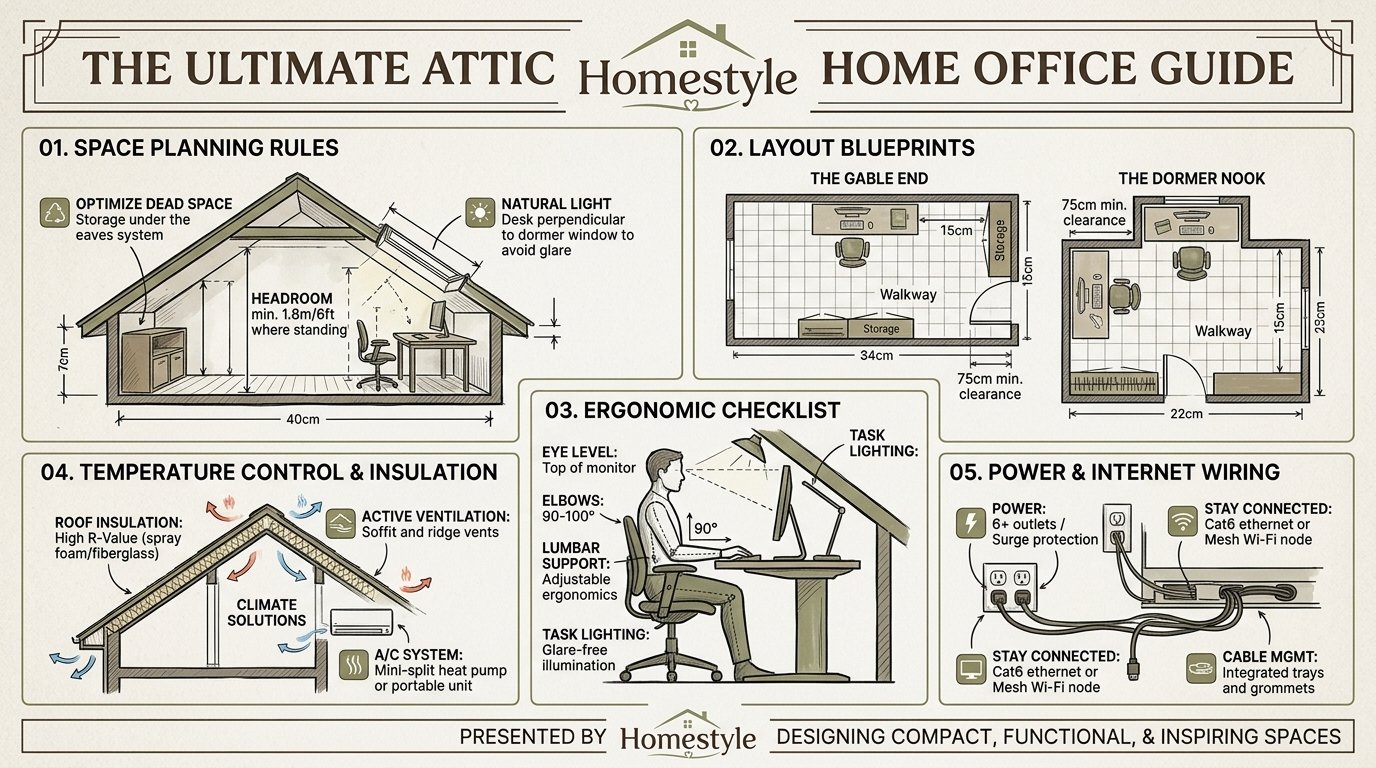
A headroom map records ceiling height at floor level across the whole attic. Mark the line where height reaches sitting height, standing height, and full chair movement height, because each task needs a different clearance.
A simple method uses a tape measure, a level, and painter tape on the floor. Measure from floor to slope every two feet, then mark zones for sitting, standing, walking, and storage in different colours for clarity.
A headroom map prevents the most common attic mistake. A desk placed under a pretty slope can force a worker to duck every time they stand, and that repeated ducking becomes tiring within one week.
Sitting, standing, and dressing clearance
Sitting clearance means the worker can sit, lean back slightly, and stand without hitting the slope. Standing clearance means full upright posture plus a small margin for stretching, reaching, and moving the chair.
Chair clearance also includes roll back space behind the desk. A chair that cannot move back at least two feet makes sitting and standing awkward, especially when the slope sits close behind the worker.
Dressing clearance is less obvious but still matters for a home office. A worker who changes shoes, stretches, or reaches a high shelf needs space above the shoulders, not just above the seated head.
The knee wall rule
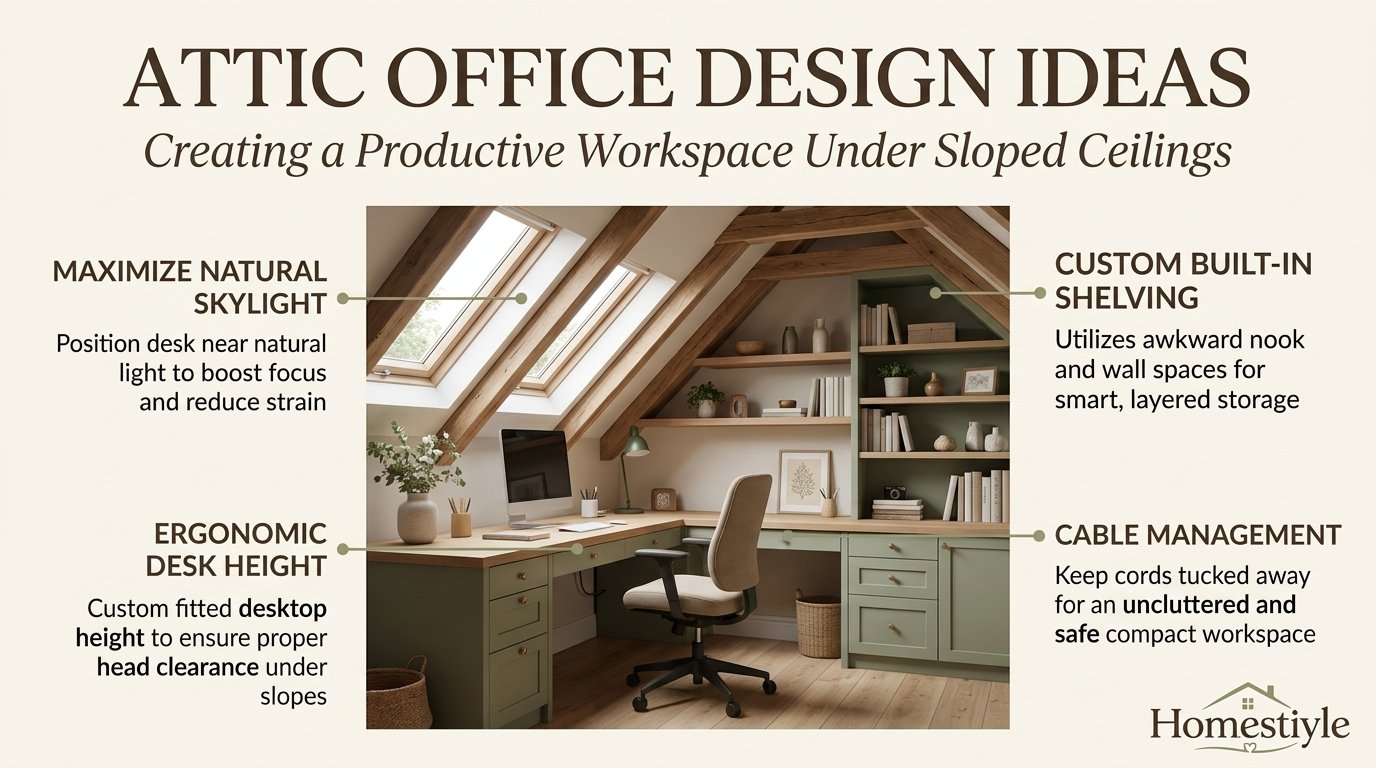
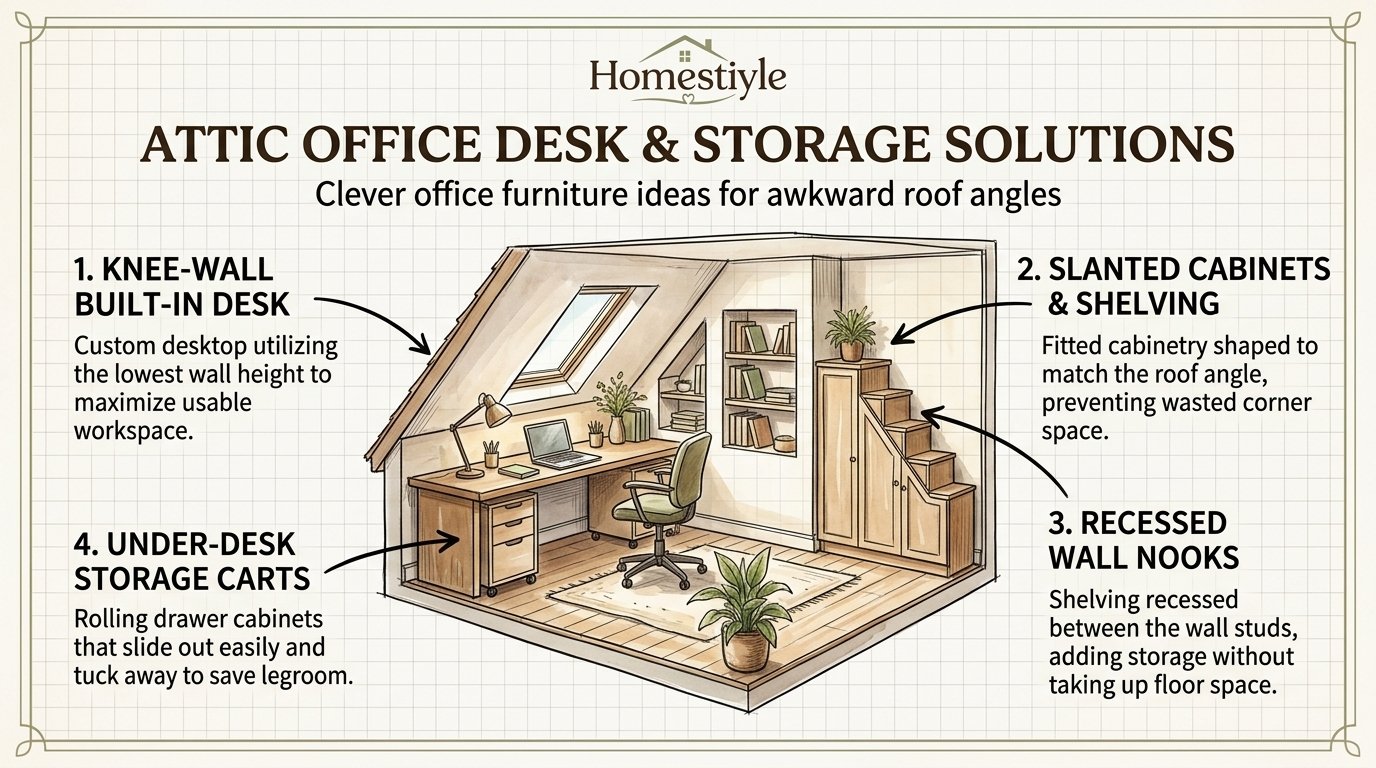
A knee wall is the short vertical wall where a sloped roof meets the floor. Height varies widely, and that height decides whether the space behind it suits drawers, shelves, seating, or only dead storage.
Low knee walls suit shallow drawers, baskets, and flat storage. Taller knee walls suit bookshelves, filing drawers, and a small bench, provided doors and drawers can open fully without hitting the slope.
Knee wall space should never hold daily items that require kneeling under a low slope. Daily files, chargers, and reference books belong within easy arm reach at desk height, not deep inside an awkward eave.
| Zone | Test to pass | Why it matters |
|---|---|---|
| Desk zone | Stand and sit freely | Prevents repeated ducking |
| Chair zone | Roll back two feet | Allows safe movement |
| Walk zone | Walk upright to stairs | Protects daily comfort |
| Storage zone | Open drawers fully | Keeps supplies usable |
Desk Placement Under Slopes
Desk in the highest clearance
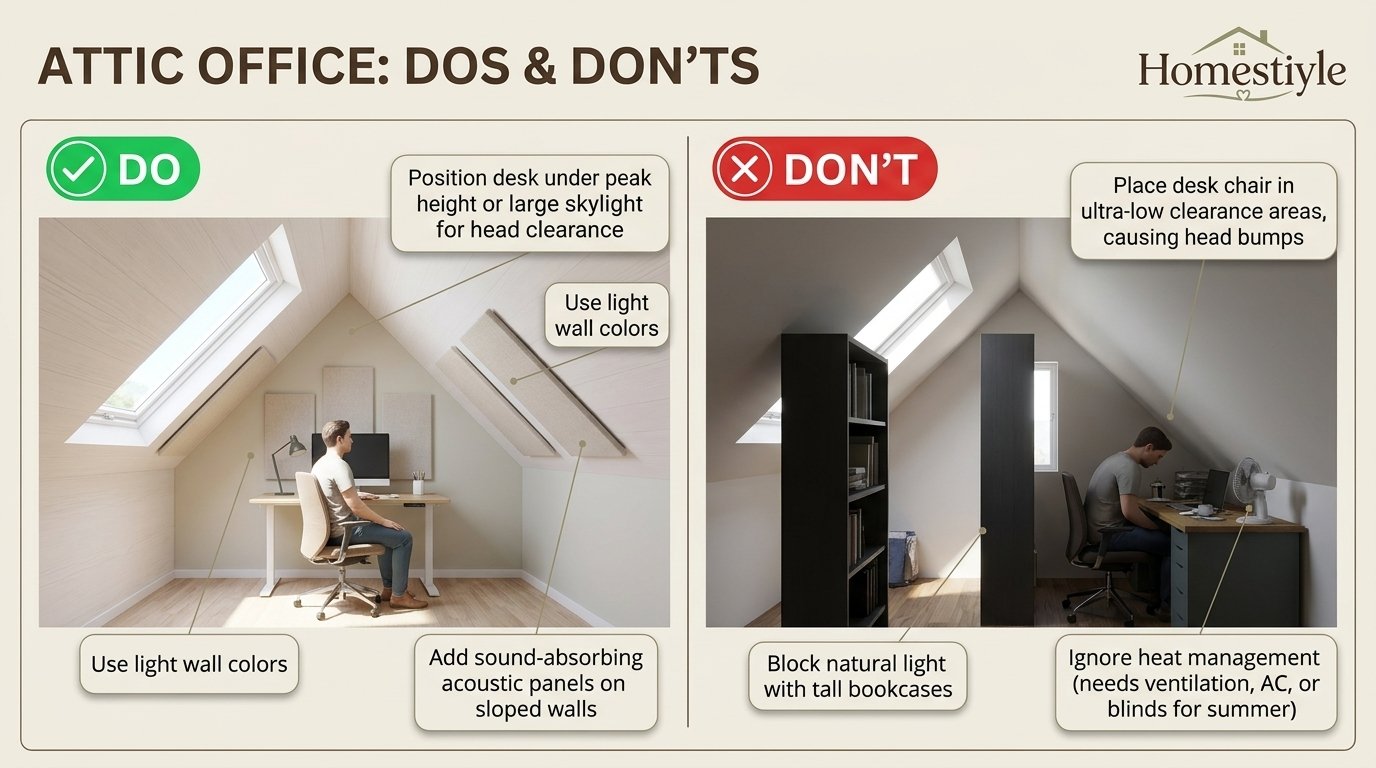
The safest starting rule places the desk where ceiling height is highest, often near a gable wall, a dormer, or the centre ridge. High clearance protects sitting, standing, and screen viewing at the same time.
High clearance also gives more options for a monitor arm, a tall lamp, and a second screen. Low clearance limits those options and forces compromises that reduce comfort during long work sessions.
High clearance does not mean the centre of the room by default. A centre desk can block walking paths, reduce storage access, and create glare from skylights directly above the screen.
Desk perpendicular to the knee wall
A desk placed perpendicular to the knee wall often works well in a long attic. One end sits near the tall wall, the chair sits in high clearance, and low slope space stays free for storage beside the desk.
Perpendicular placement also creates a clear work bay. The desk depth runs into the room, while shallow storage, a printer shelf, or a reference shelf can sit along the low wall without blocking movement.
Perpendicular placement needs a width check before purchase. Measure desk depth, chair roll back, and walking space together, because a deep desk in a narrow attic can close the walkway completely.
Desk against the gable wall
A gable wall offers a flat vertical surface and usually the tallest headroom in the attic. A desk against that wall suits a single worker, a wide monitor setup, and wall mounted storage above the desk.
Gable placement works best when power outlets sit nearby and light comes from the side, not directly behind the screen. Side light reduces glare while keeping the worker visible on video calls.
Gable placement can fail when the gable wall holds the only window. A desk facing a bright window may cause squinting, while a desk with its back to the window may cause a dark face on calls.
Desk under a dormer
A dormer creates a flat ceiling pocket and often a window with usable headroom. A desk inside a dormer feels like a separate office nook, with light, a view, and a clear boundary from the rest of the attic.
Dormer desks suit focused work, reading, and calls, because the nook limits visual distraction. A dormer seat, shelf, or pin board can also turn the sides of the dormer into useful work surfaces.
Dormer desks need a glare check at different times of day. A dormer window facing west can flood the screen in late afternoon, while a north facing dormer usually gives softer, steadier light for screen work.
| Placement | Best for | Main risk |
|---|---|---|
| Highest clearance | Long workdays | Walkway blockage |
| Perpendicular to knee wall | Long attics | Narrow width |
| Gable wall | Wide monitor setup | Window glare |
| Dormer nook | Focus work | Afternoon sun |
Chair Clearance and Movement
Chair size is a layout decision
Chair size must be measured like furniture, not guessed from a product photo. Seat width, arm height, base diameter, and roll back distance all change whether a chair fits under a slope.
A wide base needs more floor space than the seat alone suggests. A chair with arms needs clearance on both sides, and a chair that reclines needs extra space behind it for safe movement.
A narrow attic may suit a chair with folding arms, a smaller base, or a stool for short tasks. A full task chair suits a wider attic where roll back and recline space already exist.
Sit, stand, and swivel test
The sit test checks whether knees, elbows, and feet sit naturally at the desk. The stand test checks whether the worker can rise without ducking, twisting, or pushing the chair into the slope.
The swivel test checks whether the chair can turn toward storage, a printer, or a second work surface. A chair that cannot swivel freely forces twisting, and twisting during a long day increases back and neck strain.
The swivel test also matters for video calls. A worker who must turn toward a camera, a whiteboard, or a second screen needs smooth movement, not a chair trapped between desk and slope.
Floor surface and rolling
Hard flooring allows smooth chair movement, while thick carpet can slow rolling and trap chair casters. A chair mat can help, provided it fits the roll back zone and does not curl at the edges.
A chair mat under a slope needs a flat area, not a curved transition. A mat that rises toward the knee wall can tilt the chair and change posture during long sitting periods.
Floor transitions near stairs also need attention. A chair zone should never extend into a stair opening, a landing, or a narrow passage used by other people in the home.
Ergonomics for a Sloped Room
Monitor height and distance
Monitor guidance from OSHA summaries and Cornell University ergonomics guidance places the top of the screen at or slightly below eye level. That position keeps the neck near neutral during normal viewing.
Monitor distance guidance in the same summaries places the screen about arm’s length away, roughly 20 to 30 inches from the eyes. That distance reduces eye strain and keeps text readable without leaning forward.
Monitor height in an attic needs a slope check as well. A tall monitor arm may hit a slope, while a low stand may force the neck down, so arm height and slope height must be measured together.
Keyboard, mouse, and elbow height
Keyboard guidance places the keyboard at elbow height, with forearms roughly level and shoulders relaxed. A keyboard tray, an adjustable desk, or a desk at the correct height can achieve that position.
Mouse placement matters as much as keyboard height. A mouse placed too far forward, too high, or too far to the side forces shoulder reach, and that reach becomes painful during long computer days.
Wrist support should keep wrists straight, not bent up or down. A shallow wrist rest, a compact keyboard, and a mouse sized for the hand often help more than a large accessory collection.
Feet, back, and posture
Feet should rest flat on the floor or on a footrest when the desk height prevents flat feet. Dangling feet increase pressure behind the knees and reduce comfort during long sitting periods.
Back support should follow the natural lower back curve. Lumbar support, a chair back that reaches the shoulder blades, and a seat depth that leaves a small gap behind the knees support better posture.
Posture in an attic also depends on slope awareness. A worker who leans away from a slope, hunches under a low ceiling, or sits sideways to avoid a beam will lose good posture even with excellent furniture.
| Setup point | Guidance summary | Attic check |
|---|---|---|
| Monitor top | At or slightly below eye level | Arm must clear slope |
| Monitor distance | About arm’s length, 20 to 30 inches | Desk depth must allow it |
| Keyboard height | Near elbow height | Adjustable desk or tray |
| Feet | Flat or on a footrest | Floor must be level |
| Back | Lumbar support present | Chair must recline slightly |
Breaks and movement
Ergonomics guidance in workplace summaries recommends regular breaks from sitting. Short standing breaks, walking to another room, and gentle stretching help more than one long break at lunch.
A practical pattern uses a short break every 30 to 60 minutes. Stand, walk to the stairs, drink water, and look away from the screen before returning to focused work.
Standing work blocks can help when the attic allows full standing height. A height adjustable desk suits an attic only when standing clearance, monitor height, and cable length all work in the standing position.
Light: Dormers, Skylights, and Glare
The glare rule
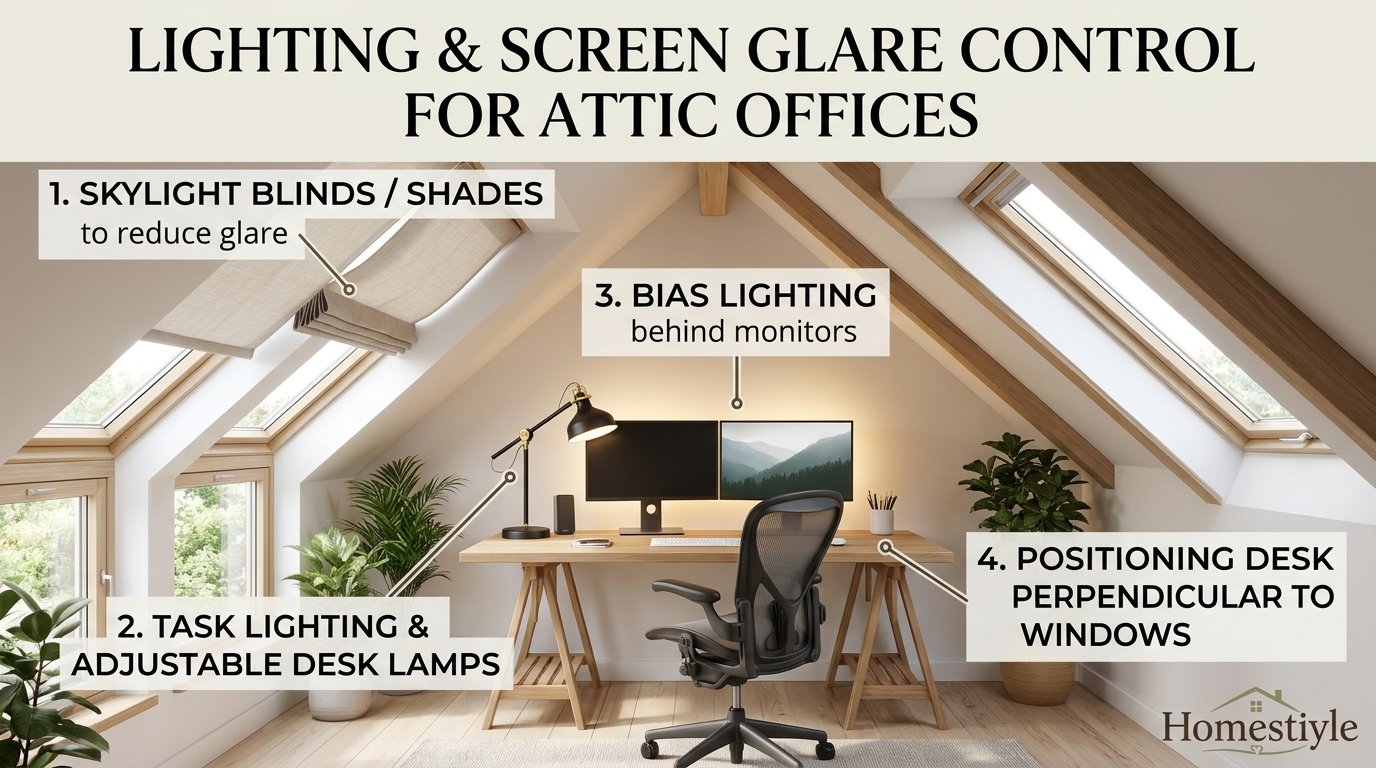
The glare rule is simple: light should come from the side of the screen, not from directly behind it or directly in front of it. Side light gives visibility without washing out the screen or darkening the face.
A window behind a screen creates bright backlight and eye strain. A window behind the worker creates a dark face on video calls and a bright halo around the head.
A skylight above a desk needs special care. Direct sun through a skylight can hit the screen at midday, even when side windows look calm, so a blind or shade is essential for skylight desks.
Dormer light
Dormer windows give controlled daylight and a view, plus headroom for a desk nook. Dormer light usually arrives from one direction, which makes glare easier to predict and control.
Dormer light changes with orientation. East dormers brighten mornings, west dormers brighten afternoons, south dormers give strong midday light, and north dormers usually give softer light through the day.
Dormer desks benefit from a sheer shade, a blind, or a curtain that can soften light without closing the room. A dormer without any shade control will force screen brightness changes all day.
Skylight light
Skylights bring daylight deep into an attic and can make a dark roof space feel open. Skylights also bring heat, glare, and a need for reliable flashing, sealing, and shade control.
Skylight placement should avoid a direct beam onto the screen during main work hours. A skylight offset to the side of the desk, or fitted with a blind, works better than a skylight centred over the monitor.
Skylight blinds need a control method that works from the desk. A manual blind on a high skylight may stay open all day, while a remote or powered blind allows quick adjustment during calls and bright periods.
Facing a window or facing away
Facing a window gives a view and natural light, but can cause squinting when sun rises or sets in that direction. Facing away from a window protects the screen but can darken the face on video calls.
Facing sideways to a window usually gives the best balance. The worker sees daylight, the screen avoids direct backlight, and the face receives soft side light that looks natural on camera.
Facing direction should be tested at morning, midday, and late afternoon. Light that works at 9 in the morning can fail at 4 in the afternoon, especially in a west facing attic.
Artificial Lighting Layers
Overhead light without shadows
Overhead light should provide even general light without creating harsh shadows on the desk. A single bright bulb in the centre can leave desk corners dark and create glare on a glossy screen.
Recessed lights, track lights, or a central fixture with a diffuser can spread light more evenly. Light colour should stay consistent across fixtures, because mixed colour temperatures look uneven and feel distracting.
Overhead light in a sloped ceiling needs fixture clearance. A pendant that hangs too low can hit a tall worker, while a flush fixture may sit too close to insulation if not rated for that space.
Task light for the desk
Task light focuses on the work surface, not the whole room. A desk lamp with adjustable brightness and direction helps during cloudy days, evening work, and detailed reading tasks.
Task light should sit to the side of the dominant hand to avoid hand shadows on paper. A lamp placed directly behind a monitor can create screen reflection, so side placement usually works better.
Task light colour should match the room and support focus. Neutral white light suits most work, while very warm light can feel sleepy and very cool light can feel harsh during long evenings.
Video call light
Video call light should light the face evenly from the front or slightly above. A small ring light, a desk lamp bounced off a wall, or a window with a sheer shade can all improve call appearance.
Call light should avoid strong light from one side only, because half lit faces look uneven on camera. A second soft light, or a light coloured wall nearby, can balance the main light source.
Call light should be tested with the actual camera, not judged by eye alone. A camera sees contrast differently, so a short test call reveals dark eyes, bright backgrounds, and colour shifts quickly.
Storage Under Eaves
Storage by eave height
Eave storage works when height matches use. Low eaves suit flat boxes, shallow drawers, and seasonal items that are used rarely and stored in labelled containers.
Medium eaves suit books, files, and supplies in drawers with full extension slides. Full extension slides matter because shallow drawers hide items at the back when slides stop short.
Tall eaves suit a bench, a bookshelf, or a wardrobe section, provided doors open fully. Tall eave storage should never block a walkway, a stair opening, or a heating vent.
Drawers beat deep cupboards
Drawers beat deep cupboards under a slope because drawers bring items out to the worker. Deep cupboards hide items at the back, and retrieving them requires kneeling, reaching, and moving other items.
Drawer depth should match the knee wall depth, usually 18 to 24 inches in many attic examples. Deeper drawers can work when slides extend fully and contents stay light enough to pull easily.
Drawer labels help more in an attic than in a flat room. A labelled drawer system prevents repeated searching under a low slope, which saves time and reduces frustration during busy days.
Built in versus freestanding storage
Built in storage uses awkward slope space efficiently and can follow the exact roof angle. Built in units also reduce gaps where dust collects and create a clean, fitted look for the office.
Freestanding storage costs less, moves easily, and suits renters or workers testing a layout. Freestanding units need a flat back and a stable floor, and tall units must be secured where required for safety.
Built in storage should wait until the desk layout is proven. A built in unit placed for a desk that later moves can lock the room into a layout that no longer works.
| Eave height | Best storage | Avoid |
|---|---|---|
| Very low | Flat boxes, seasonal items | Daily files |
| Low to medium | Shallow drawers, baskets | Deep cupboards |
| Medium to tall | Books, files, bench | Tall doors that hit slope |
Power, Data, and Wi-Fi
Power where work happens
Power should sit at desk height or just below the desk, not across the room behind storage. A worker who stretches a cable across a walkway creates a trip risk and a daily annoyance.
Power planning should count every device: computer, monitor, lamp, charger, printer, speaker, and any hub or dock. A short count early prevents a tangle of extension leads later.
Power strips should sit in a tray, a cable channel, or a desk mounted holder. A power strip on the floor under a slope collects dust and becomes hard to reach when a plug needs resetting.
Data and cable routes
Data cables should follow a planned route along a knee wall, a desk leg, or a cable channel. A planned route keeps cables away from feet, chair casters, and heating vents.
Cable length should allow desk height changes when using a height adjustable desk. A cable that fits sitting height may pull tight at standing height and damage a port or a device.
Cable labels help when several devices share one desk. A labelled cable for the monitor, the dock, and the printer saves time during troubleshooting and prevents unplugging the wrong device.
Wi-Fi in a roof space
Wi-Fi in an attic can weaken because routers often sit on a lower floor, and roof materials, distance, and metal can reduce signal. A weak signal shows as frozen video, slow uploads, and dropped calls.
A wired connection usually gives the most stable result for video calls and large files. A wired point near the desk, installed during conversion work, avoids daily Wi-Fi frustration.
A mesh Wi-Fi unit or an access point can help when wiring is not possible. Placement should be tested at the desk, not at the stairs, because signal at the stair landing does not guarantee signal at the desk.
Heat, Cooling, Insulation, and Air
Why attics run hot and cold
Attics sit directly under the roof, so they gain heat in summer and lose heat in winter faster than lower rooms. Insulation, ventilation, and heating design decide whether the office stays usable all year.
A hot attic reduces focus, increases fatigue, and makes video calls uncomfortable. A cold attic creates draughts, cold feet, and a reluctance to use the room on winter mornings.
Heat also varies by slope and window. A south facing skylight can heat one desk zone, while a shaded north corner stays cool, so one thermostat reading does not describe the whole attic.
Insulation and ventilation basics
Insulation guidance from the US Department of Energy and ENERGY STAR material stresses continuous insulation, air sealing, and correct ventilation for roof spaces. Gaps, compressed insulation, and missing air barriers reduce performance.
Ventilation should follow the roof design and local code, not guesswork. A sealed attic, a vented attic, and a conditioned attic use different details, and the wrong detail can trap moisture or reduce insulation value.
Moisture control matters for books, electronics, and paper. A damp attic can damage equipment and create musty air, so leaks, condensation, and ventilation must be checked before furniture arrives.
Heating and cooling options
A ductless mini split unit suits many attics because it heats and cools one zone without long duct runs. A mini split also allows temperature control separate from lower floors, which helps during work hours.
Portable heaters and fans can help for short periods but rarely solve a badly insulated attic. A portable unit also needs safe clearance, stable power, and a plan for noise during calls.
Heating and cooling should be tested across seasons before committing to full time attic work. A room that works in spring may fail in a heatwave or a cold snap, and that failure appears only after daily use.
Sound and Video Call Background
Sound inside the attic
Sound inside an attic travels through thin partitions, floor gaps, and stair openings. A call in the attic can disturb lower rooms, and noise from lower rooms can disturb calls.
Soft surfaces help: carpet, rugs, curtains, bookshelves, and acoustic panels reduce echo inside the room. Hard, empty attic surfaces reflect sound and make voices sound hollow on calls.
Door and stair gaps also matter. A gap under a door, an open stairwell, or a thin partition can carry more sound than a thick wall, so sealing and door choice deserve attention.
Sound from outside
Outside sound enters through windows, skylights, and roof vents. Traffic, rain on a skylight, and wind can all appear on a microphone during calls, even when the room feels quiet to the ear.
Window and skylight quality, sealing, and closing mechanisms affect outside sound. A window that does not close fully will let in more sound and draughts than a well sealed unit.
Microphone choice also helps. A headset microphone usually isolates voice better than a laptop microphone, especially in a room with echo, rain noise, or household sound.
Call background and camera angle
A call background should look calm, tidy, and professional without distracting the viewer. A plain wall, a bookshelf, or a dormer nook usually works better than a cluttered storage wall.
Camera angle should sit near eye level and show the face and shoulders. A camera placed too low looks up at the ceiling, while a camera placed too high looks down and can show a messy desk.
Background light should stay softer than face light. A bright window behind the worker will darken the face, while a soft side light keeps the face clear and the background calm.
Layouts for One Worker
Single desk against the gable
A single desk against the gable gives maximum headroom and a simple, focused layout. The worker faces a flat wall, with storage on one side and a walkway on the other.
Gable layouts suit wide monitors, a pin board, and wall shelves above the desk. Wall shelves must sit above head height when standing, not at a height that forces ducking under the slope.
Gable layouts need a light check for the specific wall. A gable window can create glare, while a gable without a window may need stronger task light during the day.
Single desk in a dormer
A dormer desk creates a separate work nook with a window, a view, and a clear boundary. Dormer desks suit writers, students, and workers who need deep focus without visual clutter.
Dormer desks suit a smaller desk, a single monitor, and a chair with a compact base. A large L shaped desk may overwhelm a dormer and block the walkway beside it.
Dormer desks benefit from side storage rather than storage behind the chair. A small drawer unit beside the desk keeps supplies close without forcing the chair into the slope.
Single desk perpendicular to the knee wall
A perpendicular desk creates a work bay that separates work from storage and walking space. The desk runs into the room, while low storage runs along the knee wall beside it.
Perpendicular desks suit long attics where a gable desk would leave too much unused slope space. The bay also gives a clear place for a printer, a reference shelf, or a second small surface.
Perpendicular desks need a width measurement for the bay. Desk depth, chair movement, and a walking path must all fit, or the bay will feel trapped rather than focused.
Layouts for Two Workers
Two desks on opposite walls
Two desks on opposite walls give each worker a separate facing direction and a separate light source. Opposite walls reduce screen visibility between workers and reduce direct call interference.
Opposite wall layouts need enough width for two chair zones. Each chair needs roll back space, and a shared walkway between desks must stay clear during the whole day.
Opposite wall layouts also need separate power and data for each desk. Shared power strips create cable tangles and arguments when one worker unplugs the wrong device.
Two desks side by side under a ridge
Two desks side by side under a ridge share high ceiling space and a central work zone. Side by side layouts suit partners who collaborate often and do not take calls at the same time.
Side by side layouts fail when both workers take calls together. Voices overlap, microphones pick up both speakers, and focus drops for both workers during simultaneous calls.
Side by side layouts benefit from a divider, a bookshelf, or an acoustic panel between desks. A low divider reduces visual distraction without blocking light or headroom.
Two zones with a shared storage wall
Two zones with a shared storage wall place desks at opposite ends and storage in the middle. Shared storage suits supplies used by both workers, while separate desks protect focus and call privacy.
Shared storage must be organised by worker or by task, not mixed randomly. Mixed storage creates searching, misplaced files, and friction when one worker moves the other worker’s materials.
Shared storage also needs a clear rule for noise. A printer, a scanner, or a filing drawer used during calls should sit away from the worker on a call, or use should pause during calls.
| Two worker layout | Strength | Main conflict |
|---|---|---|
| Opposite walls | Separate light and facing | Needs wide attic |
| Side by side ridge | Shared high ceiling | Simultaneous calls |
| Separate ends, shared storage | Clear zones | Shared noise |
Narrow Attic Layouts
The 5 foot challenge
A narrow attic, sometimes only about five and a half feet across in one example, forces hard choices. Desk depth, chair movement, and walking space cannot all expand at once.
A narrow attic suits a desk against the wall for the largest surface, a desk under a window for view, or a floating desk in the centre for breathing room and swivel space. Each option trades surface for movement.
A narrow attic should use shallow storage, wall shelves, and a compact chair. Deep drawers, wide chairs, and large equipment quickly consume the limited width and block movement.
Floating desk in a narrow room
A floating desk sits away from the wall and allows the worker to swivel and move around it. Floating desks suit narrow rooms where a wall desk traps the chair between desk and slope.
Floating desks need cable planning, because cables cannot hide inside a wall. A cable spine, a floor channel, or a desk with a cable tray keeps the floating desk tidy and safe.
Floating desks also need a stable base. A desk that wobbles when typing or leaning will distract work, so weight, leg design, and floor level matter more for a floating desk.
Wall desk with fold down surface
A fold down desk suits a narrow attic used for part time work or shared purposes. The surface folds away when not in use, freeing floor space for storage, exercise, or guest use.
Fold down desks suit laptops, single monitors, and light paperwork. Heavy monitors, large printers, and permanent equipment suit a fixed desk better than a fold down surface.
Fold down desks need a secure wall fixing and a clear swing space. A fold down surface that hits a slope, a shelf, or a door cannot open fully and becomes unusable.
Attic Office and Guest Room Combination
Office by day, guest space by night
A combination room can work when the office zone stays separate from the sleeping zone. A desk in a dormer, a bed in a low slope area, and storage between zones create a workable split.
Combination rooms fail when the bed blocks the desk, the desk blocks the bed, or bedding covers work materials every night. A clear boundary, even a curtain or a bookshelf, helps maintain both uses.
Combination rooms need a daily reset routine. Work materials should pack into one drawer or cabinet at night, and bedding should store in one place during the day, or both uses become messy.
Concealed bed options
A wall bed, a cabinet bed, or a sofa bed can free floor space during work hours. Concealed beds suit occasional guests, while a permanent bed suits frequent guests who need comfort and easy access.
Concealed beds need wall strength, floor clearance, and a safe opening path. A bed that opens into the desk, the chair zone, or a stair opening creates a safety and usability problem.
Concealed beds also need bedding storage. Pillows, duvets, and sheets need a dedicated drawer or cabinet, or they will pile on the desk and destroy the office layout.
Power and data for a dual room
A dual room needs power for both uses, not just office use. Guest charging, a bedside lamp, and a fan may share circuits with office equipment, so total load should be checked.
Data and Wi-Fi should cover both zones. A guest who works from the bed, or a worker who moves to a chair, needs signal across the room, not only at the main desk.
Lighting should also serve both uses. Bright task light suits work, while soft bedside light suits guests, so separate switches or dimmers help each use without disturbing the other.
Furniture Choices and Dimensions
Desk depth and width
Desk depth decides monitor distance and workspace for paper, notebooks, and a keyboard. A depth of 23 to 30 inches suits many monitor setups, because it allows arm’s length viewing without crowding.
Desk width decides how many screens, documents, and tools fit at once. A narrow desk suits a laptop only, while a wide desk suits two monitors, a notebook, and a reference book side by side.
Desk depth in an attic must also allow chair movement. A deep desk pushed into a slope can reduce chair space, even when the desk itself looks generous in a product photo.
Height adjustable desks
Height adjustable desks allow sitting and standing in the same workspace. Standing breaks can help during long days, provided standing clearance, monitor height, and cable length all work.
Height adjustable desks need a slope check at maximum height. A monitor arm, a tall monitor, or a shelf above the desk may hit the slope when the desk rises to standing height.
Height adjustable desks also need a stable base at both heights. A desk that wobbles at standing height will distract work and may damage equipment over time.
Chair features that matter
Chair features that matter most are seat height adjustment, lumbar support, arm height, and base stability. Those four features affect posture more than colour, material, or extra padding.
Seat depth matters for leg comfort. A seat that is too deep presses behind the knees, while a seat that is too shallow leaves thighs unsupported during long sitting periods.
Arm height should support elbows near desk height without lifting shoulders. Arms that are too high lift shoulders, while arms that are too low leave arms unsupported and increase neck strain.
Shelves, drawers, and trolleys
Shelves suit reference books, binders, and display items that need visibility. Shelves above a desk must sit high enough to avoid head contact when standing, especially under a slope.
Drawers suit files, cables, and small supplies that need dust protection. Drawer units on casters can move between desk zones, but casters must lock to prevent drift during work.
Trolleys suit printers, scanners, and shared equipment. A trolley can move out of a call zone, roll to a storage wall, and return to the desk without permanent floor commitment.
| Furniture | Key dimension | Attic warning |
|---|---|---|
| Desk | Depth 23 to 30 inches | Deep desk cuts chair space |
| Chair | Adjustable seat and lumbar | Wide base needs floor width |
| Drawer unit | Depth 18 to 24 inches | Deep drawers hide items |
| Shelf | Above standing head height | Low shelf hits slope |
Colour, Materials, and Visual Calm
Light colours for low ceilings
Light colours help a sloped room feel taller and brighter, especially near knee walls and dormers. White, pale warm white, pale grey, and soft cream reflect daylight and reduce visual heaviness.
Light colours should stay consistent across walls, knee walls, and built in storage. Mixed whites can look patchy under skylight daylight, so test paint samples in the attic at different times.
Light colours do not solve a dark attic alone. Light paint without daylight, task light, and a clear layout will still feel dim, especially on cloudy days or in north facing attics.
Warmth without clutter
Warmth in an attic comes from wood tones, textiles, and soft lighting, not from many objects. A wooden desk, a rug, and a curtain can warm a room without filling every surface.
Textiles also help sound. A rug under the desk, curtains at a dormer, and a fabric chair reduce echo and make the attic feel quieter during calls and focused work.
Warmth should stay controlled. Too many textiles, patterns, and objects create visual noise, and visual noise competes with focus during long work sessions.
Materials that handle attic conditions
Materials should handle temperature swings and occasional humidity in a roof space. Solid wood, sealed surfaces, and metal frames usually handle attic conditions better than unsealed fibreboard in damp corners.
Paper, books, and electronics need protection from direct sun and heat. A shelf near a skylight can fade books and overheat equipment, so storage should avoid direct sun paths.
Floor materials should support chair movement and cleaning. Hard flooring with a rug zone suits many attics, while wall to wall thick carpet can slow chair rolling and trap dust.
Cable, Clutter, and Daily Reset
Cable zones
Cable zones group power, data, and charging by desk, not by device scattered across the room. One cable tray per desk keeps cables tidy, accessible, and safe from chair casters.
Cable zones should allow quick unplugging for troubleshooting. A cable that is buried behind built in storage becomes a problem when a monitor, dock, or printer stops working.
Cable zones should also separate power from data where possible. Separation reduces tangles and makes future changes easier when a device is replaced or upgraded.
The one drawer rule
The one drawer rule gives every small item a single home drawer. Chargers, pens, notebooks, and small tools live in that drawer, not scattered across the desk, shelves, and floor.
One drawer prevents the attic desk from becoming a storage surface. A desk that holds only current work, a keyboard, and a monitor supports focus better than a desk covered in supplies.
One drawer also speeds the daily reset. At the end of work, current papers go into a tray, small items return to the drawer, and the desk returns to a clean starting state.
Daily reset routine
A daily reset routine takes five minutes and protects the next workday. Clear the desk, close drawers, coil cables, and return the chair to its normal position before leaving the attic.
A daily reset also reveals problems early. A cable that keeps tangling, a drawer that keeps sticking, or a chair that keeps drifting points to a layout or furniture issue worth fixing.
A weekly reset goes further. Dust surfaces, check cable connections, file loose papers, and remove items that migrated to the desk during the week but do not belong there.
Health, Breaks, and Focus
Movement during the workday
Movement during the workday protects energy and focus, especially in a small attic where steps are limited. Short walks to stairs, standing stretches, and a change of posture help more than sitting still all day.
Movement should be planned into the day, not left to chance. A timer, a calendar reminder, or a habit tied to lunch and calls can prompt regular movement without constant willpower.
Movement in an attic needs safe clearance. Stretching under a slope, standing on a chair, or exercising near a stair opening creates risk, so movement should happen in high clearance zones.
Eye strain and screen breaks
Eye strain increases when a screen sits too close, too bright, or in direct glare. Screen distance, brightness matching room light, and regular look away breaks all reduce strain.
A simple eye break pattern looks away from the screen every 20 minutes, focuses on a distant object for 20 seconds, and blinks normally. That pattern suits many workers, but eye problems need professional advice, not generic tips alone.
Screen brightness should match room brightness. A very bright screen in a dark attic, or a dim screen in a bright attic, forces eyes to work harder and increases fatigue.
Focus zones and distraction control
Focus zones separate deep work, calls, and admin tasks by time or by place. A dormer nook may suit deep work, while a larger desk zone may suit admin and calls.
Distraction control in an attic includes sound, visual clutter, and household interruptions. A closed door, a clear work signal, and a tidy desk reduce interruptions more than willpower alone.
Focus also depends on temperature and air. A hot, stuffy attic reduces concentration, so ventilation, a fan, or a temperature adjustment should happen before a focus block starts.
Costs, Scope, and Planning Ranges
Furniture only versus finished room
Furniture only costs cover a desk, chair, storage, lighting, and accessories for an existing finished attic. Finished room costs cover insulation, drywall, electrical, flooring, heating, and sometimes structural work as well.
Furniture only and finished room costs must never be compared as if they were the same scope. A low furniture total does not mean a conversion is cheap, and a high conversion total does not mean furniture is expensive.
Scope should be written down before budgeting. List every item, every trade, and every permit, then price each scope separately to avoid mixing furniture, finish, and structural costs.
Competitor reported planning ranges
Planning ranges reported by competitors for a finished loft or attic office setup include basic $5,000 to $8,000, professional $10,000 to $15,000, and executive $18,000 to $25,000 for a finished room setup. Those figures are competitor reported planning ranges only, not quotes.
General attic conversion ranges reported by competitors vary even more widely, because scope, region, permits, and finishes change totals dramatically. A basic finish, a mid finish, and a high finish can differ by tens of thousands of dollars.
Single case study totals reported by competitors, $25,000 and $27,400 in two separate cases, are single case claims only. Those totals must never be presented as typical prices, and averaging them into one typical price would mislead readers.
Contingency and permits
A contingency allowance of 10 to 15 percent helps cover hidden attic problems, such as rot, wiring surprises, or framing changes found during work. Contingency should sit outside the main budget, not inside a single line item.
Permits depend on local adopted code and the scope of work. Electrical, structural, egress, and heating changes often need permits, while furniture only changes usually do not, but local rules govern every case.
Structural checks should happen before conversion work starts. A structural professional should verify joists for live loads before the attic becomes a daily office, because furniture and people add weight the original attic may not have been designed for.
| Scope | What it includes | Budget warning |
|---|---|---|
| Furniture only | Desk, chair, storage, light | Excludes conversion work |
| Basic finished room | Insulation, drywall, floor, power | Competitor range only |
| Professional finished room | Better finishes, HVAC, storage | Scope varies widely |
| Executive finished room | Custom storage, premium finishes | Not a typical price |
Tax context only
Tax rules for a home office, as summarised in general guidance material, often mention exclusive use, regular use, and principal place of business tests. Those phrases describe general concepts, not a personal tax decision.
Tax treatment depends on employment status, business structure, and current tax law, and the Internal Revenue Service publishes the official guidance for the relevant tax year. Readers should seek a qualified tax professional before claiming any home office treatment.
Tax context should never drive attic design alone. A room designed only for a tax test, without headroom, light, and ergonomics, will fail as a daily office even if paperwork looks tidy.
Common Mistakes and Fixes
Mistake: desk under the lowest slope
A desk under the lowest slope looks compact in a photo but forces ducking, limits monitor height, and blocks chair movement. The fix moves the desk to high clearance and reserves low slope space for storage.
Low slope desks also create a psychological effect. A worker who feels trapped under a slope may avoid the room, shorten work sessions, or move work to a kitchen table instead.
Low slope space can still look good. Shallow drawers, a bench, or a plant shelf can fill low space without forcing a worker to sit under it all day.
Mistake: facing a window or skylight directly
Facing a bright window directly causes squinting, screen washout, and eye fatigue. Facing away from a window can darken the face on calls and create a bright halo behind the head.
The fix turns the desk sideways to the window or adds a blind that softens direct sun. Side light gives daylight without direct glare on the screen or the face.
Skylight desks need the same fix. A blind, a repositioned desk, or a monitor hood can reduce direct skylight glare during midday work hours.
Mistake: one power strip for everything
One power strip for everything creates tangles, overload risk, and troubleshooting confusion. A single strip also forces cables across walkways when devices sit far from the strip.
The fix adds dedicated power points near each desk, plus a cable tray for that desk. Dedicated points keep cables short, tidy, and safe from chair casters.
Power planning should also separate office power from guest power in a dual room. Separate points prevent a guest charger from unplugging office equipment during a call.
Mistake: buying furniture before measuring
Buying furniture before measuring creates returns, wasted delivery costs, and a room full of items that do not fit. A desk that looks right online can fail on depth, width, or height in a sloped room.
The fix measures headroom, desk footprint, chair roll back, and walkway before ordering. Tape outlines on the floor, plus a borrowed chair test, reveal fit problems before money is spent.
Buying order also matters. Buy the desk and chair first, test them for a week, then buy storage and accessories that fit the proven layout, not a guessed layout.
| Mistake | Symptom | Fix |
|---|---|---|
| Desk under low slope | Ducking, neck strain | Move desk to high clearance |
| Facing bright window | Squinting, washed screen | Turn desk sideways, add blind |
| One power strip | Tangles, unplugged devices | Dedicated points per desk |
| Furniture before measuring | Returns, blocked walkway | Tape outline and test first |
Step by Step Attic Office Setup Plan
Step 1: measure and map
Measure floor dimensions, ceiling height every two feet, knee wall height, dormer width, and stair clearance. Mark high clearance, low slope, and walkway zones on a simple floor sketch.
Measure power points, window positions, and heating vents on the same sketch. A sketch that omits power or vents will mislead furniture placement later in the process.
Photograph the attic from each corner with a tape measure visible in key spots. Photographs help when shopping, because memory alone often underestimates slope and width problems.
Step 2: test the desk position
Tape the desk footprint on the floor, place a chair in the zone, and work there for a morning with a laptop. Test sitting, standing, swivel, video calls, and reaching storage during the test.
Test light at morning, midday, and afternoon during the same test day. Light that works in the morning may fail in the afternoon, and a one hour test will miss that change.
Adjust the tape outline after the test. A desk moved six inches toward high clearance, or turned sideways to a window, often solves problems that furniture alone cannot fix.
Step 3: fix structure, insulation, and power first
Fix structural, insulation, electrical, and heating issues before buying finished furniture. Those trades need access to walls, floors, and ceilings that furniture will later block.
Structural verification should come from a qualified professional where joists, loads, or framing changes are involved. A desk and a worker add daily load, and original attic joists may not suit that load.
Power and data points should be installed at desk height during this stage. Retrofitting power after built in storage arrives costs more and creates more disruption.
Step 4: install desk, chair, and light
Install the desk and chair first, then set monitor height, keyboard height, and task light. Ergonomics should be set with the actual worker seated, not from a generic diagram alone.
Set monitor distance, monitor height, and chair height together, because changing one changes the others. A monitor set correctly for a low chair will fail when the chair rises to the correct height.
Test video calls after light is installed. A short test call reveals face lighting, background clutter, and microphone echo before the office becomes a daily workroom.
Step 5: add storage and finish details
Add storage only after the desk layout is proven for at least a week. Storage placed for a guessed layout often blocks movement, while storage placed for a proven layout supports daily work.
Add drawers under eaves, shelves above standing head height, and a cable tray for each desk. Label drawers, file papers, and remove any item that does not support work in the attic.
Finish with colour, textiles, and a daily reset routine. A rug, a curtain, and a tidy desk make the attic feel like an office, not a storage room with a desk inside.
Decision Matrix for Attic Office Choices
Choose by attic width
Width decides many choices before style does. A wide attic allows two desks, a large chair, and deep storage, while a narrow attic forces shallow storage, a compact chair, and a single work bay.
Width should be measured at chair height, not just at floor level. A floor that looks wide can narrow quickly at shoulder height when slopes converge, and that narrowing affects chair movement.
Width also affects call privacy. A wide attic can separate two workers by distance, while a narrow attic needs dividers, headsets, and call scheduling to protect privacy.
Choose by work type
Work type decides desk size, screen count, and storage needs. Writing and study need a small desk and bookshelf space, while design and coding need a wide desk and two screens.
Call heavy work needs sound control, face light, and a tidy background more than a large desk. A call heavy worker should prioritise microphone quality, headset use, and a calm background.
Paper heavy work needs filing drawers, a printer zone, and a clear paper tray system. Paper heavy work without filing space quickly covers the desk and slows every task.
Choose by budget and scope
Budget should follow scope, not the other way round. A furniture only budget cannot fund a finished conversion, and a conversion budget should not be spent on furniture before structural work is complete.
Budget priorities should be headroom, power, light, chair, and desk, in that order. Accessories, art, and premium finishes should wait until those five priorities work well every day.
Budget should include contingency, delivery, assembly, and permit costs where relevant. A budget that omits delivery or assembly will understate the true cost of a finished attic office.
| Decision | Wide attic | Narrow attic |
|---|---|---|
| Workers | One or two zones | One main worker |
| Desk | Wide or L shaped | Shallow wall or floating |
| Chair | Full task chair | Compact chair |
| Storage | Drawers and shelves | Shallow drawers only |
Safety and Code Notes for US Readers
Habitable room basics
Habitable room rules in model code summaries from the International Code Council cover ceiling height, floor area, light, ventilation, heating, and emergency escape. Local adopted code and local amendments govern every real project, so local verification is essential.
Attic office use does not automatically create a legal bedroom, and bedroom rules should not be copied into an office plan without checking local office and habitable room definitions. Office use, sleeping use, and storage use can trigger different rules.
Smoke alarms, carbon monoxide alarms where required, and safe stair access matter for any daily attic use. Alarms should follow manufacturer placement guidance and local code, not guesswork.
Electrical and stair safety
Electrical work in an attic should follow local code and qualified installation where required. Overloaded circuits, extension leads across walkways, and unprotected cables near insulation create fire and trip risks.
Stair safety matters because attic stairs are often steep, narrow, or pull down style. A daily office needs safe, comfortable stair access, good lighting on stairs, and a handrail where required by local code.
Storage should never block stairs, landings, or escape routes. A storage unit placed for convenience can become a barrier during an emergency, so escape paths must stay clear at all times.
When to seek professional help
Professional help is needed for structural changes, electrical changes, roof changes, and heating changes. A professional assessment protects safety, code compliance, and long term value of the home.
Professional help is also useful for insulation, ventilation, and moisture problems. A roof space with damp, mould, or poor ventilation needs diagnosis before furniture, books, and electronics move in.
Professional help should be sought early, not after furniture arrives. Early advice can change layout, scope, and budget before money is spent on items that later need moving.
FAQs
How do attic office ideas start without wasting money?
Attic office ideas start with a headroom map, a taped desk outline, and a morning work test. That test reveals ducking, glare, and chair problems before furniture, wiring, or built in storage locks in a bad layout.
Where should a desk sit in a sloped attic?
A desk should sit where ceiling height is highest, often near a gable wall, a dormer, or the centre ridge. High clearance protects sitting, standing, monitor height, and chair movement during a full workday.
Should a desk face a window in an attic?
A desk should usually sit sideways to a window, not facing it directly or with its back to it. Side light reduces screen glare, keeps the face visible on calls, and avoids squinting during bright periods.
How does a skylight affect an attic desk?
A skylight brings daylight deep into the attic but can create midday glare and heat directly above a desk. A blind, a sideways desk position, or a skylight offset from the screen usually controls that glare.
What is the best desk depth for an attic office?
A desk depth of 23 to 30 inches suits many monitor setups because it allows arm’s length viewing. Depth must still leave chair roll back space, so desk depth and walkway width must be measured together.
How much chair space does an attic office need?
A chair needs roll back space of at least two feet behind the desk, plus swivel space for turning toward storage. A chair trapped between desk and slope forces twisting and reduces comfort during long days.
What monitor height works in a sloped room?
Monitor guidance from OSHA summaries and Cornell University ergonomics guidance places the top of the screen at or slightly below eye level. Monitor arm height must also clear the slope at the chosen desk position.
How far should a monitor sit from the eyes?
Monitor distance guidance places the screen about arm’s length away, roughly 20 to 30 inches from the eyes. That distance supports readable text without leaning forward or straining the neck.
What keyboard height is correct for attic work?
Keyboard height should sit near elbow height, with forearms roughly level and shoulders relaxed. An adjustable desk, a keyboard tray, or a desk at the correct height can achieve that position.
How can Wi-Fi be improved in an attic office?
Wi-Fi improves most reliably with a wired connection near the desk, installed during conversion work. A mesh unit or access point can help when wiring is not possible, but signal must be tested at the desk itself.
How many power points does an attic desk need?
An attic desk needs points for a computer, monitor, lamp, charger, and any dock or printer, plus a spare point for future devices. Power at desk height prevents cables crossing walkways and reduces trip risk.
What storage works best under low eaves?
Low eaves suit shallow drawers, flat boxes, and seasonal items in labelled containers. Daily files and supplies should sit at desk height, not deep inside a low eave that requires kneeling.
Are built in drawers better than freestanding storage?
Built in drawers use slope space efficiently and follow the roof angle, while freestanding storage costs less and moves easily. Built in storage should wait until the desk layout is proven for at least a week.
How can two people share an attic office?
Two people share an attic best with separate desks, separate power, and separate call zones. Opposite walls or separate ends work better than side by side desks when both workers take calls.
What makes a narrow attic office work?
A narrow attic works with a shallow desk, a compact chair, wall shelves, and shallow drawers. A floating desk can also help, because it allows swivel and movement where a wall desk traps the chair.
Can an attic office also serve as a guest room?
An attic office can serve guests when the desk zone stays separate from the sleeping zone. A concealed bed, a daily reset routine, and dedicated bedding storage keep both uses workable without daily chaos.
How much does an attic office conversion cost?
Competitor reported planning ranges for a finished loft or attic office setup include basic $5,000 to $8,000, professional $10,000 to $15,000, and executive $18,000 to $25,000. Those figures are planning ranges only, not quotes, and scope changes totals widely.
Should a contingency budget be included?
A contingency allowance of 10 to 15 percent helps cover hidden attic problems found during work. Contingency should sit outside the main budget, so a surprise does not consume money needed for basic finishes.
How is attic heat controlled in summer?
Attic heat is controlled by insulation, air sealing, ventilation, and a heating and cooling system sized for the roof space. Guidance from the US Department of Energy and ENERGY STAR material stresses continuous insulation and correct ventilation details.
How is attic sound controlled for video calls?
Attic sound improves with soft surfaces, sealed door gaps, a headset microphone, and a calm background. Carpet, curtains, bookshelves, and acoustic panels reduce echo, while a headset isolates voice better than a laptop microphone.
What lighting works best for attic video calls?
Video call lighting should light the face evenly from the front or slightly above, with background light softer than face light. A test call with the actual camera reveals dark eyes, bright backgrounds, and colour shifts quickly.
What are the biggest attic office mistakes?
The biggest mistakes are a desk under the lowest slope, facing a bright window directly, one power strip for everything, and buying furniture before measuring. Each mistake has a simple fix, but fixes cost more after installation.
When should a professional be consulted for an attic office?
A professional should be consulted for structural changes, electrical changes, roof changes, heating changes, and moisture problems. Early advice protects safety, code compliance, and budget before furniture locks in a layout.
Does an attic office qualify for home office tax treatment?
Home office tax treatment depends on employment status, business structure, and current tax law, with general concepts including exclusive use and regular use. Readers should check Internal Revenue Service guidance for the relevant year and seek a qualified tax professional.
Conclusion on Attic Office Ideas
Attic office ideas succeed when work comes first, slope comes second, and decoration comes last. A desk in high clearance, a chair that moves freely, a screen without glare, and power close at hand create a room that supports a full day, not just a photograph.
Attic office ideas also reward patience. Measure the slope, tape the layout, test light through the day, fix structure and power early, then add storage that fits a proven layout. That sequence prevents returns, rework, and a room that looks finished but feels uncomfortable by afternoon.
Start with the headroom map and the morning work test, then choose the desk position that passes sitting, standing, swivel, and call tests together. Get a structural and local code check before conversion work, and keep costs as labelled planning ranges until a local professional prices the actual scope.
